Meet The Imagine Cup Grants Winners

The 4 winning teams of first ever Imagine Cup Grants was announced on Microsoft Citizenship Blog. The winners were in Davos to meet with Microsoft Chairman, Bill Gates and to participate in a roundtable discussion on the challenges and opportunities facing young people today. The Imagine Cup Grants program is a three-year, $3 million competitive grant program to help Imagine Cup participants take their ideas and their projects and transform them into a business or nonprofit that can bring the benefit of their technology to the communities that need it most.

Here’s some more about the four winning teams:


Team Apptenders (Croatia)

Project Name:  KiDnect

Team Members: Ivan Antonic, Ivan Borko, Karmela Bresan, Dominik Tomicevic

KiDnect is a Kinect-based solution for on-premise and remote physical therapy for children, especially those born with Cerebral Palsy. This software has the ability to monitor a child’s exercises to ensure they are being completed correctly, and then provides statistical analysis to the therapist. Team Apptenders hopes to add multilingual interfaces in order to integrate additional sensors for limb rotation monitoring and advanced data analysis.


Team Falcon Dev (Ecuador)

Project Name: SkillBox

Team Members: José Vicente Anilema Guadalupe, Gerardo Francisco Pérez Layedra, Henry Javier Paca Quinaluiza, Juan José Morales Ruiz

SkillBox is an affordable solution to help children who are hearing impaired by translating all audio received from a teacher in a classroom into sign language. A wireless headset captures the sound, sends it to the computer and SkillBox then shows the corresponding sign for the word or phrase. Team Falcon Dev hopes to take their first step in making SkillBox available to children by selling their technology solution to public schools in Ecuador.


Team OaSys (Jordan)

Project Name: Horizon

Team Members: Hani AbuHuwaij, Mohammad Azzam, Monir Abu Hilal, Mohammad Saleh, Yousef Wadi

Horizon is a software and hardware system that allows people who do not have use of their hands/arms to use a computer. Specifically, it tracks head movements and translates these movements into mouse movements. Users get full control of a computer and a cellphone, and can browse the internet, type and connect with ease and at a low cost. Team OaSys hopes to improve the software stack by optimizing and adding features, pilot client lab preparations and hire sub-contractors.


Team LifeLens (United States)

Project Name: LifeLens

Team Members: Tristan Gibeau, Cy Khormaee, Wilson To, Jason Wakizaka, Helena Xu

Lifelens is an innovative point-of-care tool to diagnose malaria using an augmented Windows Phone application. The project addresses the unacceptably high child mortality rates caused by the lack of detection and availability of treatment of malarial diseases. Team Lifelens is ready to develop their project for launch. They will use the investment for distribution of their devices, subsidizing the phones and field testing.


Full story: http://blogs.technet.com/b/microsoftupblog/archive/2012/01/27/meet-the-imagine-cup-students-turned-social-entrepreneurs.aspx 


by Ooi Keng SiangMSPSMT via Ooiks’s Blog

Imagine Cup 2012: Show the World What You Can Do

The Imagine Cup has something for everyone. Are you all about app development? Or does building a gadget prototype that leverages natural user interface motivate you? The Imagine Cup has added two new Challenges for you to grow your technical skills. Sign up and start competing today in the Windows Metro Style App Challenge sponsored by Microsoft Windows or the Kinect Fun Labs Challenge sponsored by Microsoft Studios.

Already signed up to compete in one of 2012 Competitions, Software Design, Game Design: Xbox/Windows, Game Design: Phone or the, Windows Azure or Windows Phone Challenges? Increase your chances to share your world-changing ideas at the Worldwide Finals in Sydney, Australia, by signing up to compete in one of these two new Challenges.


Captain Rob Miles sharing about Software Design


Captain Andrew Parsons sharing about Game Design


Captain Jura Clapman sharing about  Windows Metro Style App Challenge


Captain Dan Waters sharing about  Kinect Fun Labs Challenge


by Ooi Keng SiangMSPSMT via Ooiks’s Blog

Windows Phone: ListBox ItemsSource and List

In Windows Phone development, you can always assigning List<T> collection to a ListBox through ItemSource. If and only if you never remove any item in the List<T> collection before you assign the ListBox ItemSource to null first.

ListBox.ItemSource = SomethingList;

I encounter a situation where I display a list of items in a ListBox on my main page. Then user can to select the item in ListBox and edit or delete the item on the next page. Adding new item to the list or edit the item in the list doesn’t cause any problem at all. But if user delete any item on the second page and go back to the main page, the app will encounter an unexceptional error on App.xmal.cs. The error message show “The parameter is incorrect”, which give me no hint or clue what actually go wrong. Searching on the web for the error message or -2147024809 code give me no result at all.


After many testing I only figure out the problem that I assigning a List<T> collection to a ListBox was a bad idea especially the item can be remove by user during runtime.  The main problem here is ListBox won’t have know what happen to the List<T> collection when some items got removed on the other pages and yet it continue to assign to those items. The solution is simple, just replace the List<T> collection to ObservableCollection<T> collection. The different between List<T> and  ObservableCollection<T> is  ObservableCollection<T> will tell ListBox something changed and it need to update instead of crashing the whole app.

Now the problem had solved, but it doesn’t mean ListBox ItemSource must assigned to ObservableCollection<T> instead of List<T>. If the list of items wanted to display doesn’t change through out the app lifetime, it is still better to use List<T> because of it’s simplicity which save you more processing and memory.

by Ooi Keng Siang (Microsoft Student Partners) via Ooiks’s Blog

Imagine Cup 2012 – Kinect Fun Labs Challenge

Microsoft is giving away 100 Kinect for Windows sensor away and only need to advanced to round 2 in order to grab one of them. Yes, this is the  Kinect Fun Labs Challenge that just announced in Imagine Cup 2012. Microsoft is challenge students to think about entertainment with a social conscience and brings the Imagine Cup into the living room.  It is a unique opportunity for students to develop applications that change the world with the Fun Labs area of Xbox 360 and Xbox LIVE. The Imagine Cup Kinect Fun Labs Challenge will test students ability to build a prototype which leverages natural user interface (NUI) features such as skeletal tracking, speech recognition, face recognition, and gestures.


All you need  in round one is a project plan that describes your team’s gadget, the intent of your gadget, and details of the unique gadget features and how your gadget aligns to the Imagine Cup 2012 Theme – Imagine a world where technology helps solve the toughest problems. Round 1 submissions will be due at 23:59 PM GMT on 06 March 2012, so don’t be late and start your planning now.


Questions or doubt? Get your questions ready! Join Kinect Fun Labs Challenge Captain Dan Waters on 14 February at 16:00 or 23:30 GMT via Live Meeting and ask him about competing in the Kinect Fun Labs Challenge. There are two ways to join Live Meeting., found out at  Kinect Fun Labs Challenge page.


Source: http://www.imaginecup.com/Competition/mycompetitionportal.aspx?competitionId=68


by Ooi Keng SiangMSPSMT via Ooiks’s Blog

Imagine Cup 2012 – Windows Metro Style App Challenge

As we all know Windows 8 is on the way and is going to be the next big product of Microsoft in this year, so this year Microsoft Imagine Cup bring a new challenge to the student call Windows Metro Style App Challenge. Microsoft challenge the student to be at the forefront of those creating applications for this new platform. Apps are the center of the Windows 8 experience and great apps start with you. This Challenge will test students ability to prototype a Metro style app that takes advantage of Windows 8 features and design principles to deliver an experience that solves one of the world’s toughest problems and wows not only the judges but those across the globe. So sign up and get ready to take your first quiz!

The first round is super duper simple. Just grab your 3 smartest friends and join in the quiz. Your team just need to score more than 50% in order to get into the next round. Simple enough! Just select any one of the time during the 24 hour quiz session and join in.

  • Quiz 1 – 31 January 2012
  • Quiz 2 – 7 February 2012
  • Quiz 3 – 14 February 2012
  • Quiz 4 – 21 February 2012
  • Quiz 5 – 28 February 2012
  • Quiz 6  -6 March 2012


So you still have questions and doubt about this challenge? Then get your questions ready! Join Windows Metro Style App Challenge Captain Jura Clapman on 15 February at 16:00 GMT or 16 February at 03:00 GMT via Live Meeting and ask her about competing in the Windows Metro Style App Challenge. There are two ways to join Live Meeting, found it out at  Windows Metro Style App Challenge page.

Sources: http://www.imaginecup.com/Competition/mycompetitionportal.aspx?competitionId=70


by Ooi Keng SiangMSPSMT via Ooiks’s Blog

Windows Phone Marketplace Opens for Distribution in Malaysia

According to the Windows Phone Developer Blog, Windows Phone marketplace is now allow submit apps for distribution in 6 new markets; Argentina, China, Indonesia, Malaysia, Peru and the Philippines. This is such a great news to kick start year 2012 for Windows Phone developers in Malaysia. But wait, some developers are confused between submitting app targeting Malaysia market and marketplace availability in Malaysia.

I’m come out a list of questions and answers to help clear the doubt regarding this news.


Q: Is marketplace now available in Malaysia?

A: No, even though developers now can targeting Malaysia market when submitting their apps, but Windows Phone marketplace is still not available in Malaysia yet.


Q: When will Windows Phone marketplace available in Malaysia?

A: Microsoft did not make any official statement currently yet, but we can expect the marketplace coming very soon since it now allow apps targeting Malaysia market.


Q: Can Malaysia developers register in App Hub now?

A: No, not yet. Since the marketplace is not available yet.


Q: How can Malaysia developers submit their apps now?

A: Malaysia developers still need to submit their apps through third party company like Yalla App and they can select Malaysia as one of their distribution market.


Q: What is the additional requirement to submit apps targeting Malaysia market?

A: Content that consider as offensive in Malaysia local law are not allowed. Examples of potentially offensive content: [Source: 3.10 Country/Region Specific Requirements]

  • People in revealing clothing or in sexually suggestive poses
  • Religious references
  • Alcohol references
  • Sexual or bathroom humor
  • Simulated or actual gambling


Q: Why start developing Windows Phone apps now, even the marketplace is not available yet?

A: The biggest reason is to get a head start over the other when the marketplace is available. Since we can expect the marketplace coming very soon to Malaysia and apps that targeting Malaysia is still very limited now. This is a great opportunity to kick start a new apps targeting Malaysia users or porting your existing apps from other platforms and stay ahead from your competitors.


I hope this post give a better picture of what actually happen and what you as a Windows Phone developers in Malaysia can expect. If you have any questions, do post on the comment and I will try my best to answer it.

by Ooi Keng Siang via Ooiks’s Blog 

Everyone Deserves To Enjoy Playing Game

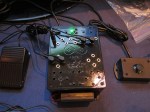
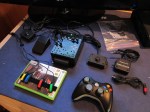
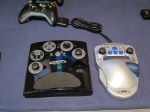
Computer or console gaming is fun and everyone deserves to enjoy the fun of playing the game including people with disabilities. I’m very lucky to meet Mark Barlet (Co-founder & President of the AbleGamers Foundation) during the Microsoft Accelerating Asia Pacific at Kuala Lumpur, Malaysia where he bring all different kind of controller devices for Xbox 360 all the way from US to showcase how people with disabilities can enjoy playing game just like anyone else.

As long as you are still alive and breathing, no matter what disabilities you have, there will be a custom made controller device for you to play the game on Xbox 360. I personally try out the controller myself. It is very simple. I can play a racing game with just 2 or 3 fingers only. Well, the easy level of car racing game might look too simple for a hard core gamer, but gaming is purely for the sake of fun here. There are also many other controllers showcase there like controller control by mouth, only left hand or only right hand and many more. All controllers are specially designed for certain disabilities. Of course, Microsoft Kinect with Fruit Ninja game is showcase there too, just swing your hand and cut the fruits!

The Microsoft Accelerating Asia Pacific summit is a media and analyst gathering focused on showcasing how Microsoft, through technology and partnerships, is making a real and positive impact in Asia. One of the objectives is to showcase how Microsoft accessible technology can help improve the living of people with certain disabilities. I’m very impressed with all the guests invited to share their experience on how accessible technology can help them. For example like Tan Siew Ling from Microsoft citizenship share her experience on how those small little features that Microsoft build into operating system like Narrator which help her get connected with everyone in the world through Internet.

With just software alone is not enough, we also need hardware to help. One of the panel discussion invited Mark Barlet, Doojin Choi (Executive Director, National Information Society Agency) and Dr. Young-il Kim (Director, The National Library Support Center for Individuals with Disabilities) to discuss on “Accessibility Principles In Hardware Design”. Yes, we definably need all those hardware to enhance the information and communication technology experience especially for people with disabilities. Not just for the purpose of getting the job done in work, but for the fun of gaming as well.

by Ooi Keng Siang via Ooiks’s Blog