Building Windows Phone 7 App on Windows 8

With the release of Windows Phone SDK 7.1.1 Update, building Windows Phone 7 app on Windows 8 is now possible. I decided to jump on and try out Windows 8 while building my Windows Phone app, but I hit the wall right after I install Windows 8, Visual Studio and all the SDK then compile my Windows Phone app. Visual Studio told me that Microsoft.Xna.Framework.dll (which is use to play sound in my Silverlight app) is not found.

Aren’t the new 7.1.1 update suppose to make everything all right? It turn out that there are some problems with XNA which didn’t get installed when I run Windows Phone SDK 7.1. After some searching on the net and I found the solution for this. Just simple follow the following step by step:

  1. Download and install Zune Software (if you haven’t install)
  2. Download and install Games for Windows Marketplace Client
  3. Download and install Windows Phone SDK 7.1
  4. Download and install Windows Phone SDK 7.1.1 Update

Oh, just in case you installed everything but without the  Games for Windows Marketplace Client, you will need to repeat the step 2 to 4 (if you haven’t install Zune, then you need to repeat step 1 to 4).

Although everything work perfectly OK, but the emulator is a little bit lag compare running on Windows 7 which was a known issue in Windows 8.


Source


by Ooi Keng Siang via Ooiks’s Blog

Imagine Cup 2012 Local Malaysia – The Top 30 Teams

The top 30 teams which has successfully advanced to the final of Imagine Cup 2012 local Malaysia in Software Design category is announced today. They will represent their own university to compete in the national final round which will be held at Sabah in May. It will be a fun and exciting competition at there. The champion team shall represent Malaysia in Software Design category to the worldwide final of Imagine Cup 2012 at Sydney, Australia.

Yes, there is a slight delay on the announcement due to large amount of awesome submissions create and submit by student around Malaysia. Yeah, I can’t wait to see what students bring this year as they always surprise me with the creativity and innovation. I guess I will have to wait until the final then. Check out the top 30 teams below.

  1. 01001 – KDU University College
  2. 4GM – Universiti Putra Malaysia
  3. B&B – Taylor’s University
  4. Beyond the Imagination – Universiti Kebangsaan Malaysia
  5. Bluetenders – Universiti Teknologi Malaysia
  6. Cyber Warriors – Universiti Pertahanan Nasional Malaysia
  7. D. Jester – Tunku Abdul Rahman  College
  8. Descendants – Universiti Malaysia Sabah
  9. Drinking Water – Asia Pacific University College of Technology & Innovation (UCTI)
  10. E-Transcend – Universiti Malaya
  11. GoGreen++ – Universiti Sains Malaysia
  12. Green Age Heroes – Universiti Kebangsaan Malaysia
  13. HFMS – Universiti Malaya
  14. Insquare – Universiti Tun Hussein Onn Malaysia
  15. IT SEEKERS – Universiti Islam Antarabangsa Malaysia
  16. KiHECT – Universiti Technologi Malaysia
  17. Legion – Universiti Teknikal Malaysia Melaka
  18. Live Green – Universiti Tunku Abdul Rahman
  19. Mango –  Universiti Tunku Abdul Rahman
  20. Project Care –  Universiti Tunku Abdul Rahman
  21. Python – Universiti Teknikal Malaysia Melaka
  22. Seempearl (Simple) –  Universiti Islam Antarabangsa Malaysia
  23. SIRiUs – Universiti Putra Malaysia
  24. SLIM – Tunku Abdul Rahman College
  25. SMART UNICORN – Universiti Kebangsaan Malaysia
  26. Super Massive –  Universiti Teknikal Malaysia Melaka
  27. The Rhapsody –  Asia Pacific University College of Technology & Innovation (UCTI)
  28. W.3.A. – Universiti Putra Malaysia
  29. Wired In – Universiti Malaysia Pahang
  30. Wizard – Taylor’s University


This is going to be very exciting at Sabah. Yes, I will going to report live from the national final of Imagine Cup 2012 Malaysia in May. So stay tune in my blog or twitter for the latest update from time to time.

Visit Imagine Cup Malaysia official website for the complete announcement of the top 30 teams: http://www.myimaginecup.com/finalists.aspx


by Ooi Keng Siang – MSPSMT via Ooiks’s Blog


Get Facebook Fans Page News Feed / RSS Feed / Atom Feed

 Wonder why it is so tricky to just get an URL to display RSS feed / Atom feed from a fans page. Anyway, here is a very simple 2 steps trick to get the URL for your fans page news feed update to RSS Feed  or Atom Feed so that you can export to your blog or app.


Step 1 – Get Fans Page Id

Open any picture / image in the fans page. Then extract the fans page id from the URL. the example of image shown below, the fans page id is 378156838895039


Step 2 –  Complete The URL

The  Atom Feed and  RSS Feed URL format are as follow:


If I use the facebook Id I get on the step one, the Atom Feed and RSS feed URL will be as follow:


Short and simple, but I just wonder why Facebook don’t have this button to save all the trouble.


by Ooi Keng Siang via Ooiks’s Blog 

Fish Wrangler AutoBot 1.05 – Support Official Website

The script is updated. Now it support the Fish Wrangler official website and  Fish Wrangler in Facebook at the same time. This version is just a quick update without much testing. Please report any bugs or problem you found in the comment so that I can follow up.


Script Description

Fish Wrangler AutoBot is a simple user script to automate the process of catching fish in Fish Wrangler application in Facebook. In a simple word, bot for Fish Wrangler. Time of next rod cast will show on the webpage title and page. Users can customize the script according to their need by themselves such as add extra random time delay before casting the rod (Please look for UserPreferenceSetting in the script).

Continue reading Fish Wrangler AutoBot 1.05 – Support Official Website

10 Reasons to Care about Imagine Cup

The Microsoft Imagine Cup is a world’s premier student technology competition encourages students around the world to apply their imagination, their passion, and their creativity to solve the world toughest problems through technology innovations. In past years, students have created technology platforms to help relief workers locate victims, affordable devices to revolutionize classroom education in impoverished areas, and mobile games that teach children the importance of caring for the environment.

In ten years, the Imagine Cup has grown to be a truly global competition focused on finding solutions to real-world problems. Since 2003, over 1.4 million students have participated in the Imagine Cup with 358,000 students representing 183 countries and regions registering for the Imagine Cup 2011 competition. The Imagine Cup 2012 Worldwide Finals will be hosted in Sydney, Australia and we’re already excited to see the amazing ways that students will change the world through technology. You could be an Imagine Cup 2012 winner, so gather your friends and sign up for a competition today!

It is never too late to get started. Here, we give you 10 reasons why you as a student should join Microsoft Imagine Cup:


Reason #1 – Solve the World’s Toughest Problem

There are many challenges faced by our world today and even in our own local communities.  Imagine Cup knows students have the knowledge, the passion, and the drive to make a difference. Imagine Cup challenge students to help solve the 8 United Nations Millennium Development Goals by creating real-world applications and solutions that can help make the world a better place.  Students will develop, test, and build their ideas into applications that can help solve some of the world’s toughest problems, such as poverty, hunger, gender inequality, environmental sustainability, and access education and healthcare.


This is just part of the long post in Imagine Cup Social Media Team Blog. Check out the the other 9 reasons there.


by Ooi Keng Siang via Ooiks’s Blog

Windows Phone – Contact Data Cannot Persist in Isolated Storage

Last few days, I was trying to develop a new project that involve saving some Contact data from phone to isolated storage or IsolatedStorageSettings. The reason behind this , I want the app to keep track of a list of favorite contacts. Everything went smooth until the part saving the contacts into isolated storage. It was a nightmare. Saving a copy of contact data into isolated storage did not give me any warning or problem at all. However after I quit the app and restart, the app fail to retrieve any contact data from isolated storage. It look like the app never successful save any data to the isolated storage.


public List<FavoriteContact> LoadFavoriteContactsFromStorage()
{
    try
    {
        if (IsolatedStorageSettings.ApplicationSettings.Contains("FavoriteContacts"))
        {
            List<FavoriteContact> tempFavoriteContacts;
            if (IsolatedStorageSettings.ApplicationSettings.TryGetValue<List<FavoriteContact>>("FavoriteContacts", out tempFavoriteContacts))
            {
                return (tempFavoriteContacts);
            }
        }
    }
    catch
    {

    }

    return (new List<FavoriteContact>());
}

public void SaveFavoriteContactsToStorage()
{
    IsolatedStorageSettings.ApplicationSettings.Remove("FavoriteContacts");
    IsolatedStorageSettings.ApplicationSettings.Add("FavoriteContacts", FavoriteContacts);
    IsolatedStorageSettings.ApplicationSettings.Save();
}


At first, I though I did something wrong in load or save function related with isolated storage. After debugging the whole day, it turn out that the function work perfectly OK without any problem. It did not throw me a single error at all. After Bing here and there on the Internet, at last I found culprit of this problem. It is the Contact data itself. In the Best Practices for Contact class, I found the following message:

Contact data is provided as a read-only snapshot. If your application needs fresh data, repeat the original search periodically.

Although the app did not throw any error, warning or exception, but I think it is not possible to direct save the Contact object into the isolated storage. Why I think instead of I’m very sure? This is because I can’t find any information related witht the same problem I’m facing, so I assume read-only Contact object can’t be saved. I replace the Contact class with another class I build with the similar properties with Contact class, then everything work nicely.

The conclusion here is you can’t save Contact object to isolated storage or IsolatedStorageSettings . No error, warning or exception if you do that, but it just don’t work and it will screw your whole day by letting you figure out what happen actually.

by Ooi Keng Siang via Ooiks’s Blog
Fish Wrangler AutoBot 1.04

Sorry guys and girls who waited for me to fix this script, because I’m not active in playing this game thus I didn’t realize the bug in the script.  Special thanks to fishiii who report the bugs found in the script. A big help from him/her as s/he report the bug in a very detail which help me save a lot of time to fix the bug and release this version in a short time. Next time if anyone of you found any bug in the script, just tell me through the comment.


Script Description

Fish Wrangler AutoBot is a simple user script to automate the process of catching fish in Fish Wrangler application in Facebook. In a simple word, bot for Fish Wrangler. Time of next rod cast will show on the webpage title and page. Users can customize the script according to their need by themselves such as add extra random time delay before casting the rod (Please look for UserPreferenceSetting in the script).

Continue reading Fish Wrangler AutoBot 1.04

Imagine Cup 2012: Tips for Recording Video Demo

The due date for Imagine Cup 2012 Local Malaysia round one is coming soon and many Imagine Cup challenges second round due date too. As usual, recording a video of your system demo is usually one of the requirement for round one submission for Software Design in Imagine Cup Malaysia. If you haven’t start planing how to do your video demo, now is a good time to do so. Don’t wait until last minute because if you fail to plan mean you plan to fail.

Every year I’m sharing some tips and trick competitors should highlight and becareful when they are planning and creating their video demo of their system. I’m going to do this again this year. This is my personal point of view and it is NOT related with any Imagine Cup Malaysia round selection guide or what so ever. I would said, take it as a reference only.

Continue reading Imagine Cup 2012: Tips for Recording Video Demo

Get Advertisement on Your Windows Phone App with Ad Rotator

Displaying advertisement in free app to generate some extra revenue is a very common approach use by many developers in many different platform. If you are living in the country where  Microsoft Advertising pubCenter is supported, then good for you because you will have a much easier life. But if you are not, or would like to show not only ad from Microsoft provider, then this post if for you.

I had personally tried Google AdMob and Smaato ad provider for Windows Phone before. They don’t work out nicely for me. Google AdMob SDK crash randomly when request ad from server (post). While Smatoo didn’t show any ad in the app some time when use in my home country (post). Microsoft Advertising pubCenter  is not an option for me since it is not available in Malaysia.

Then I come across Windows Phone 7 Ad Rotator, which can show ads from different providers. It support both Google AdMob and Smaato, so I decided to give it a try. End up it work perfectly in my app. The Ad Rotator solve the crash problem in Google AdMob native SDK (now I can use back AdMob) and it also help to display ad from different providers when the other provider fail to show any ad. For example, I set both Smaato and AdMob in Ad Rotator, when AdMob fail to show any ad,  Smaato will take over and show the ad instead. This help to maximize the revenue of your free app in many different countries.

Currently Ad Rotator is in version 1.0 which support Microsoft PubCenter, AdDuplex, Google AdMob, Inner-Active, MobFox, Smaato and Default House Ad. It also support both Silverlight and XNA app in Windows Phone. You can find a very easy tutorial here. It is very easy to integrate in your Windows Phone app. I will recommend any developer who want to show advertisement on their free app to give this a try.

I had now switch to Ad Rotator to display ads from Smaato and AdMob. Mainly because it can switch between different providers. When one failed to show, the others will take over. Second, I can add more ad providers later on without making any changes in my source code. Although I can further maximize the revenue by using different ad providers in different countries (eCPM will depend on the ad display, country and ad provider), but I don’t have any idea which ad provider give better pay on which country yet, so I will stick with 50-50 for Smaato and AdMob currently.

by Ooi Keng Siang via Ooiks’s Blog

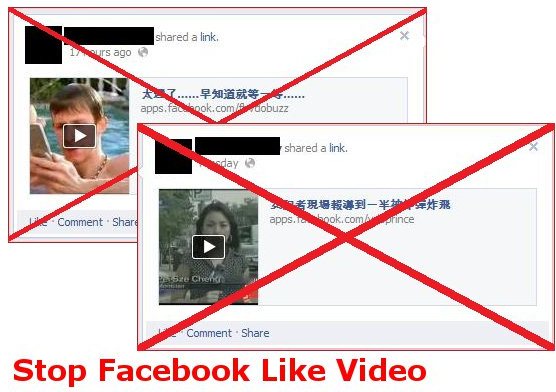
Stop Facebook Like Video 1.2

Those Chinese video sharing website just don’t give up, do they? They are adding more domain name to their video sharing website and force viewer to like and share the video before watching it. I had update the script to support up to 5 known domain name for the video sharing. If you found any new domain, just post on the comment and I will update the script to by pass that.


Script Description

Have enough for those website that force you to like the video before you can watch them? The worse part is the video will post on your Facebook wall without you knowing what is the content of the video at the first place.
This script can help you get rip of those trouble. When you click on the video link post by your friends, it will first load up the website and then the script will automatically redirect you to YouTube that playing that video bypass the like button. You no longer need to like the video first before you watch it and you can make sure your Facebook wall is clean without rubbish!


Continue reading Stop Facebook Like Video 1.2