Imagine Cup 2012: Show the World What You Can Do

The Imagine Cup has something for everyone. Are you all about app development? Or does building a gadget prototype that leverages natural user interface motivate you? The Imagine Cup has added two new Challenges for you to grow your technical skills. Sign up and start competing today in the Windows Metro Style App Challenge sponsored by Microsoft Windows or the Kinect Fun Labs Challenge sponsored by Microsoft Studios.

Already signed up to compete in one of 2012 Competitions, Software Design, Game Design: Xbox/Windows, Game Design: Phone or the, Windows Azure or Windows Phone Challenges? Increase your chances to share your world-changing ideas at the Worldwide Finals in Sydney, Australia, by signing up to compete in one of these two new Challenges.


Captain Rob Miles sharing about Software Design


Captain Andrew Parsons sharing about Game Design


Captain Jura Clapman sharing about  Windows Metro Style App Challenge


Captain Dan Waters sharing about  Kinect Fun Labs Challenge


by Ooi Keng SiangMSPSMT via Ooiks’s Blog

Windows Phone: ListBox ItemsSource and List

In Windows Phone development, you can always assigning List<T> collection to a ListBox through ItemSource. If and only if you never remove any item in the List<T> collection before you assign the ListBox ItemSource to null first.

ListBox.ItemSource = SomethingList;

I encounter a situation where I display a list of items in a ListBox on my main page. Then user can to select the item in ListBox and edit or delete the item on the next page. Adding new item to the list or edit the item in the list doesn’t cause any problem at all. But if user delete any item on the second page and go back to the main page, the app will encounter an unexceptional error on App.xmal.cs. The error message show “The parameter is incorrect”, which give me no hint or clue what actually go wrong. Searching on the web for the error message or -2147024809 code give me no result at all.


After many testing I only figure out the problem that I assigning a List<T> collection to a ListBox was a bad idea especially the item can be remove by user during runtime.  The main problem here is ListBox won’t have know what happen to the List<T> collection when some items got removed on the other pages and yet it continue to assign to those items. The solution is simple, just replace the List<T> collection to ObservableCollection<T> collection. The different between List<T> and  ObservableCollection<T> is  ObservableCollection<T> will tell ListBox something changed and it need to update instead of crashing the whole app.

Now the problem had solved, but it doesn’t mean ListBox ItemSource must assigned to ObservableCollection<T> instead of List<T>. If the list of items wanted to display doesn’t change through out the app lifetime, it is still better to use List<T> because of it’s simplicity which save you more processing and memory.

by Ooi Keng Siang (Microsoft Student Partners) via Ooiks’s Blog

Imagine Cup 2012 – Kinect Fun Labs Challenge

Microsoft is giving away 100 Kinect for Windows sensor away and only need to advanced to round 2 in order to grab one of them. Yes, this is the  Kinect Fun Labs Challenge that just announced in Imagine Cup 2012. Microsoft is challenge students to think about entertainment with a social conscience and brings the Imagine Cup into the living room.  It is a unique opportunity for students to develop applications that change the world with the Fun Labs area of Xbox 360 and Xbox LIVE. The Imagine Cup Kinect Fun Labs Challenge will test students ability to build a prototype which leverages natural user interface (NUI) features such as skeletal tracking, speech recognition, face recognition, and gestures.


All you need  in round one is a project plan that describes your team’s gadget, the intent of your gadget, and details of the unique gadget features and how your gadget aligns to the Imagine Cup 2012 Theme – Imagine a world where technology helps solve the toughest problems. Round 1 submissions will be due at 23:59 PM GMT on 06 March 2012, so don’t be late and start your planning now.


Questions or doubt? Get your questions ready! Join Kinect Fun Labs Challenge Captain Dan Waters on 14 February at 16:00 or 23:30 GMT via Live Meeting and ask him about competing in the Kinect Fun Labs Challenge. There are two ways to join Live Meeting., found out at  Kinect Fun Labs Challenge page.


Source: http://www.imaginecup.com/Competition/mycompetitionportal.aspx?competitionId=68


by Ooi Keng SiangMSPSMT via Ooiks’s Blog

Imagine Cup 2012 – Windows Metro Style App Challenge

As we all know Windows 8 is on the way and is going to be the next big product of Microsoft in this year, so this year Microsoft Imagine Cup bring a new challenge to the student call Windows Metro Style App Challenge. Microsoft challenge the student to be at the forefront of those creating applications for this new platform. Apps are the center of the Windows 8 experience and great apps start with you. This Challenge will test students ability to prototype a Metro style app that takes advantage of Windows 8 features and design principles to deliver an experience that solves one of the world’s toughest problems and wows not only the judges but those across the globe. So sign up and get ready to take your first quiz!

The first round is super duper simple. Just grab your 3 smartest friends and join in the quiz. Your team just need to score more than 50% in order to get into the next round. Simple enough! Just select any one of the time during the 24 hour quiz session and join in.

  • Quiz 1 – 31 January 2012
  • Quiz 2 – 7 February 2012
  • Quiz 3 – 14 February 2012
  • Quiz 4 – 21 February 2012
  • Quiz 5 – 28 February 2012
  • Quiz 6  -6 March 2012


So you still have questions and doubt about this challenge? Then get your questions ready! Join Windows Metro Style App Challenge Captain Jura Clapman on 15 February at 16:00 GMT or 16 February at 03:00 GMT via Live Meeting and ask her about competing in the Windows Metro Style App Challenge. There are two ways to join Live Meeting, found it out at  Windows Metro Style App Challenge page.

Sources: http://www.imaginecup.com/Competition/mycompetitionportal.aspx?competitionId=70


by Ooi Keng SiangMSPSMT via Ooiks’s Blog

Windows Phone Marketplace Opens for Distribution in Malaysia

According to the Windows Phone Developer Blog, Windows Phone marketplace is now allow submit apps for distribution in 6 new markets; Argentina, China, Indonesia, Malaysia, Peru and the Philippines. This is such a great news to kick start year 2012 for Windows Phone developers in Malaysia. But wait, some developers are confused between submitting app targeting Malaysia market and marketplace availability in Malaysia.

I’m come out a list of questions and answers to help clear the doubt regarding this news.


Q: Is marketplace now available in Malaysia?

A: No, even though developers now can targeting Malaysia market when submitting their apps, but Windows Phone marketplace is still not available in Malaysia yet.


Q: When will Windows Phone marketplace available in Malaysia?

A: Microsoft did not make any official statement currently yet, but we can expect the marketplace coming very soon since it now allow apps targeting Malaysia market.


Q: Can Malaysia developers register in App Hub now?

A: No, not yet. Since the marketplace is not available yet.


Q: How can Malaysia developers submit their apps now?

A: Malaysia developers still need to submit their apps through third party company like Yalla App and they can select Malaysia as one of their distribution market.


Q: What is the additional requirement to submit apps targeting Malaysia market?

A: Content that consider as offensive in Malaysia local law are not allowed. Examples of potentially offensive content: [Source: 3.10 Country/Region Specific Requirements]

  • People in revealing clothing or in sexually suggestive poses
  • Religious references
  • Alcohol references
  • Sexual or bathroom humor
  • Simulated or actual gambling


Q: Why start developing Windows Phone apps now, even the marketplace is not available yet?

A: The biggest reason is to get a head start over the other when the marketplace is available. Since we can expect the marketplace coming very soon to Malaysia and apps that targeting Malaysia is still very limited now. This is a great opportunity to kick start a new apps targeting Malaysia users or porting your existing apps from other platforms and stay ahead from your competitors.


I hope this post give a better picture of what actually happen and what you as a Windows Phone developers in Malaysia can expect. If you have any questions, do post on the comment and I will try my best to answer it.

by Ooi Keng Siang via Ooiks’s Blog 

Everyone Deserves To Enjoy Playing Game

Computer or console gaming is fun and everyone deserves to enjoy the fun of playing the game including people with disabilities. I’m very lucky to meet Mark Barlet (Co-founder & President of the AbleGamers Foundation) during the Microsoft Accelerating Asia Pacific at Kuala Lumpur, Malaysia where he bring all different kind of controller devices for Xbox 360 all the way from US to showcase how people with disabilities can enjoy playing game just like anyone else.

As long as you are still alive and breathing, no matter what disabilities you have, there will be a custom made controller device for you to play the game on Xbox 360. I personally try out the controller myself. It is very simple. I can play a racing game with just 2 or 3 fingers only. Well, the easy level of car racing game might look too simple for a hard core gamer, but gaming is purely for the sake of fun here. There are also many other controllers showcase there like controller control by mouth, only left hand or only right hand and many more. All controllers are specially designed for certain disabilities. Of course, Microsoft Kinect with Fruit Ninja game is showcase there too, just swing your hand and cut the fruits!

The Microsoft Accelerating Asia Pacific summit is a media and analyst gathering focused on showcasing how Microsoft, through technology and partnerships, is making a real and positive impact in Asia. One of the objectives is to showcase how Microsoft accessible technology can help improve the living of people with certain disabilities. I’m very impressed with all the guests invited to share their experience on how accessible technology can help them. For example like Tan Siew Ling from Microsoft citizenship share her experience on how those small little features that Microsoft build into operating system like Narrator which help her get connected with everyone in the world through Internet.

With just software alone is not enough, we also need hardware to help. One of the panel discussion invited Mark Barlet, Doojin Choi (Executive Director, National Information Society Agency) and Dr. Young-il Kim (Director, The National Library Support Center for Individuals with Disabilities) to discuss on “Accessibility Principles In Hardware Design”. Yes, we definably need all those hardware to enhance the information and communication technology experience especially for people with disabilities. Not just for the purpose of getting the job done in work, but for the fun of gaming as well.

by Ooi Keng Siang via Ooiks’s Blog

Bad Experience with App Exchange / App Gateway

Currently Windows Phone 7 Marketplace is not available in Malaysia, and the only way for Malaysia Windows Phone developers to submit our applications is through third party companies like Yalla App or App Exchange (they just rename their website to App Gateway recently, check the update in the end of this post). I personally experience the service offer by this 2 companies and App Exchange had pissed me off. If compare both Yalla App and App Exchange, App Exchange is just super duper terrible, horrible and vegetable! I think the “great service” offer by App Exchange deserve a blog post from me.

If you ever think of submit your app through App Exchange, below are the reason why you should go away:

Expansive

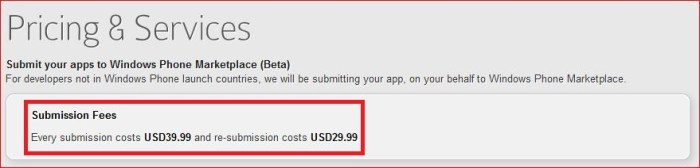
I mean very expansive, a lot expansive.  Compare  Yalla App and App Exchange this two companies, Yalla App charge 1.00 USD for each app submission while App Exchange charge 39.99 USD (previously 19.99 USD) for each app submission. It is 40 times much more expansive to submit your app through App Exchange than Yalla App. It is just 99 USD to open an account in marketplace and yet App Exchange charge developer 39.99 USD for each app submission. Imagine how much they can earn when you submit your app through App Exchange.
 

Only Free App 

Even App Exchange charge high amount of fee on developer for each app submission, only free app is allowed currently. Yes, you wouldn’t earn a single sen through app download but only through advertisement put on your app only (if you got put advertisement in your app at the first place).


Terrible Customer Service

If you have a question about their service, don’t even think they will reply you in e-mail.  Seriously, they never reply e-mail. Previously, I submitted an app and they mess up my application description which they ignore all the formating I made, I complain this through e-mail, and they never reply my e-mail until today. While the other time I complain my app submission problem to them through e-mail, they also never reply my e-mail, completely! Customer service zero!


Horrible Website Design 

Once you open App Exchange website, you will find out. I guess any experience web designer or web programmer can create a better website than App Exchange website. Basically you can’t found any information on the website other than how you pay them! Unlike Yalla App, if you mistakenly submit a wrong size of icon image, Yalla App will stop you from completing the app submission, but App Exchange will let you submit and then reject your app later on (Yes, that cost you one time of app submission money).


Random App Submission Failure Reasons

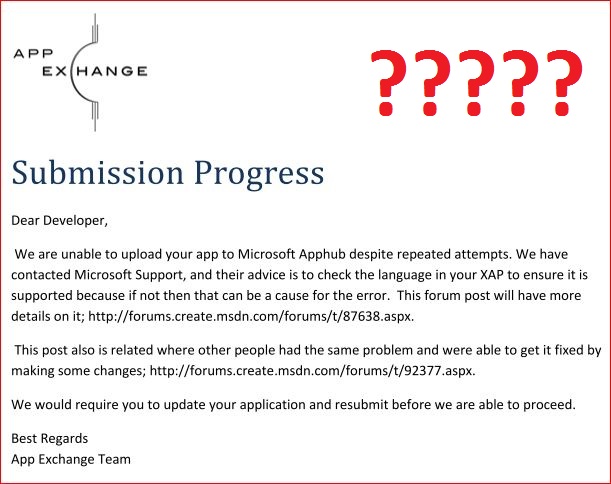
You may receive some very funny random submission failure reason from App Exchange which is not from Windows Phone marketplace but App Exchange instead. I had submitted an app with the content in English language but App Exchange reject my app and said language used in my app was not supported so they fail to submit my app (Note: the report was generated by App Exchange not Windows Phone marketplace). Can’t they understand what is English? Never mind, I submit another app but also got rejected with the reason they can’t open my xap file! OK, why App Exchange need to open my XAP file? Aren’t Windows Phone marketplace is the one who will validate my app? By the way, this 2 case also cost one app submission fee even the app never went though any verification.
 

Incorrect Report

Don’t trust all the e-mail send by App Exchange. One of my friend who submitted an app through App Exchange and the app get published successfully on marketplace, but App Exchange e-mail my friend saying the app fail to go through verification process and attached a report from Windows Phone marketplace. The app had been published and App Exchange still want to earn more money by telling my friend to re-submit the app again?


Email Spamming

Without any reason, I receive lot of e-mail from App Exchange today telling me all the apps that already published on marketplace is published! Man, those apps was published long time ago, and you had notified me before this, why send the same thing to me again and again?


Now, you may wonder even with the terrible service of App Exchange and still I submitted multiple app through App Exchange. This is because I was pointed to submit my app through App Exchange and someone is paying the bill instead. I wound not pay a single sen for their terrible service. If you want to submit your Windows Phone application and Windows Phone marketplace is not available in your country yet, go ahead with other company like Yalla App and forget about App Exchange. Don’t ruin your app and your mood by going through all the terrible service.


Update #1: App Exchange had just renamed their service to App Gateway instead with the following reason.

Unfortunately, due to a Domain Name dispute, Salesforce.com has claimed “app-exchange.com” as belonging to them because they had appexchange.salesforce.com before we registered our domain name. We have agreed to change our name and App-Exchange.com is now App-Gateway.com

Salesforce want to claim the URL? Really? That sound more like they just screw thing up and want to change to a new domain name and a new website name to brush away what they did before. Bad, very bad!


by Ooi Keng Siang via Ooiks’s Blog

Moving Toward A Better Future

Day two of the Accelerating Asia Pacific summit kicked off with a quote from Bill gates that said, “The world is getting better but it’s not getting better fast enough, and it’s not getting better for everyone”.  This set the tone for the rest of the day where Microsoft showcased their efforts around working together with governments and organizations to create better cities, healthcare services, and disaster response systems.

Technology has been integrated into our daily lives to provide us with better services and facilities. Julian Goh, Urban Planning Director from Siemens Corporate Technology, shared how utilising information and communication technology helped make the impossible possible. For example, the Mass Rapid Transit system in Singapore was improved by sharing critical data to facilitate more transits on the same railway while improving the safety aspect.

As more and more government services in different countries are moving towards an e-government system, technology is now more important than before.  With these technological changes, we are now living in a city we could never have imagined before.

Using information and communication technology to enhance the quality of healthcare is not uncommon but there are still several challenges to be solved such as interoperability between different systems, data privacy, and security.

Jenny Prince (Plunket), Dr. Ilias Yee (Sexual and Reproductive Health and Rights Programme), and Mubbashir Iftikhar (KPJ Healthcare) shared their experience on how technology has created better healthcare services.  In addition, they also recognized that this is just the beginning and recommended that software companies, governments, and patients must work together in order to progress healthcare services.

The infamous Japan 2011 earthquake was the most devastating natural disaster in recent years. It was very interesting to learn that Windows Azure played a major role in processing and monitoring the radiation levels in the Fukushima Nuclear Power Plant.  Despite the sheer volume of data, the application was created within a day.  In addition, Shugo Ikemoto (NPO Support Center for Program Development) and Kei Kudo (NPO Sodateage Net) shared how technology could aid Japan’s recovery from the disaster.

It was refreshing to learn how Microsoft is making a difference to create a better tomorrow, and a better future. The world is getting better and everyone has a part to play in creating a better tomorrow.

by Ooi Keng Siang (Microsoft Student Partners) via Ooiks’s Blog

The Impact of Microsoft in Asia Pacific

The Accelerating Asia Pacific summit is a media and analyst gathering showcasing how Microsoft, through technology and partnerships, is making a real and positive impact in Asia. I’m honoured to be selected as one of the student bloggers to attend this great event and to share the stories through my blog.  Here are the standout topics and discussions from day 1 of the event.

It’s always interesting to learn more about the latest innovation in Microsoft Research. Prior to this event, I interned at Microsoft Research India for three months so I’m very excited to learn about their latest innovations. Edward Cutrell, Microsoft Research India, shared more about the project call, CGNet Swara, which will enable everyone to report local news or issues in their local language. I can see how this could have an impact in India where a lot of news happens every day but goes unheard by the authorities because it is never covered by the local newspapers. Jonathan Tien also shared about the project Engkoo from Microsoft Research Asia, which enables learning of English in China through translation knowledge from billions of web pages.

Another topic which I thought was really interesting was raising awareness of Microsoft’s efforts in building in features which few people are aware of, such as Narrator, into their operating systems. Tan Siew Ling’s, Society for the Physically Disabled, experience on using features such as Narrator enables visual impaired people to use the computer freely left a deep impression on me, and a greater appreciation for Microsoft and the efforts the company is making to cater to the disabled.

Here’s an interesting thought that came out of a panel discussion on investing in students, start-ups and entrepreneurs – parents in Asia are likely to ask their children if they want to become an engineer or doctor in the future, but never an entrepreneur. This was one of the key barriers for students in Asia Pacific identified by Johnathan Lee from Cradle Fund. Johnathan went on to highlight that some of the fundamentals of starting a business included funding and support which Microsoft’s BizSpark program provides, creating a lower risk opportunity for all entrepreneuers.

The panel discussion “We don’t wait for change, we make change” was one of my favourites from day 1 as it involved two ex-Imagine Cup winners – Levi Tan Ong (Imagine Cup 2010 Game Design category) and James Pinto (Imagine Cup 2008 Embedded Development) together with Hunter Walkengorst from qutbluebox discussing how students can turn their ideas into reality. Because I’m part of the Microsoft Student Partners Social Media Team for Imagine Cup, it was really inspirational to see past competitors take their ideas to the next level and start a business from it.

Next up was my panel discussion on technology engaging students. This was my first time as a panelist and I was really nervous about it but Jason Trump from Microsoft guided me all the way through and I think the discussion went well. I had the opportunity to meet some great people from this panel discussion such as Mechai Viravaiddya from Population and Community Development Association, who started the bamboo school which educates students with all the skills required to earn a living on their own in Thailand. I also met Dr. Vu from HCMC University of Education also shared how technology can help in learning and education. All in all, a fantastic experience for me.

Education through gaming? Yeah, sign me up for that! Kids nowadays play games more than everything else, education through gaming will be more effective now. I strongly agree with the point made by Khong Yee Jian from Creative Robotics Education that with technology like Microsoft’s Kinect, kids can enjoy the game while learning something useful and get some exercise! Levi gave the example of how we can even learn something from a first person shooter game, like Gears of War, through throwing a flash bang before entering the house to rescue the hostages while taking down the enemy at the same time. Hmm, the point seems right to me, although is not something common will happen, but this is something anyone can pick up in the game without realizing it.

The most inspiring thing from day 1 had to be Feng Yan-Ting from Taiwan sharing how technology changed her life. Yan-Ting was diagnosed with cerebral palsy since but this never stopped her from learning computer technology. Through Unlimited Potential program, she can now type e-mail messages and communicate with her family members and friends. Now I’ve always believed that the computer is accessible for everyone, the only question is whether people want to learn it. If Yan-Ting can overcome all her pain and difficulty to learn computer technology, then others who are luckier than her should do it too.

I would say that Microsoft is really making a different to help NGOs, partners and students to achieve their goals through Microsoft technologies. I have no doubts that Microsoft is creating a big impact in Asia as seen through the sharing by the panelists from different countries, fields and background. I’m happy to say that this is all just the beginning, through Microsoft technologies and partnership with NGOs, I strongly believe Microsoft will create a bigger impact in Asia and reach out to everyone who needs the help.

by Ooi Keng Siang (Microsoft Student Partners) via Ooiks’s Blog

Fish Wrangler AutoBot 1.03

Surprisingly, nobody seen to tell me there is a bug in the script where the script doesn’t play any sound when found treasure chests if you are using secure connection (https) in Facebook. Hmm, I wonder if any player still using it, else I might just stop updating the script.

Script Description

Fish Wrangler AutoBot is a simple user script to automate the process of catching fish in Fish Wrangler application in Facebook. In a simple word, bot for Fish Wrangler. Time of next rod cast will show on the webpage title and page. Users can customize the script according to their need by themselves such as add extra random time delay before casting the rod (Please look for UserPreferenceSetting in the script).


Main Features

  • Automatically cast rod when time’s up with extra random time define by user.
  • Show next rod casting time and others timer in the page and title.
  • Play music when found treasure cheats.
  • Cross-browsers support.

Paltform Support

Browser Support

  • Mozilla Firefox with Greasemonkey add-on (Tested with Mozilla Firefox 8.0.1 with Greasemonkey 0.9.13 add-on)
  • Opera (Tested with Opera 11.50)
  • Google Chrome (Tested with Google Chrome 15.0)

Precautions

  • Use this script at your own risk because AutoBot script is again the rule set by Fish Wrangler, that is users are prohibits the use of auto-refreshers, BOTs, constantly refreshing the Fish Now link.
  • You are reminded not to use your real name or the same name you use in Facebook to post / reply discussion here because some one might go after you and please don’t ask me why I use my real name here.
  • Do uninstall any other Fish Wrangler automation scripts or auto page reload scripts before install this script to prevent conflict with this script.

Known Issues

  • The script may appear much later after the page had loaded.

How to Install User Script

Download

Download through userscript website.

Changelog

Version 1.03

  • Fix no sound when found treasure chests running on secure connection.
  • Sound for treasure chests is now play direct from the script instead of stream it from other site (only for Firefox and Opera web browser).

by Ooi Keng Siang via Ooiks’s Blog