How to Disable Buzz in Gmail

After a week of having Google Buzz in my Gmail, I decided to disable it. Google Buzz for me is just another spam box in Gmail. Basically all my friends whom use Buzz already have a Twitter account and they just integrate their Twitter with Buzz. What Buzz do is just simply duplicating all tweets in Twitter into Buzz. Although most of my friends do duplicate their tweets to Facebook as well, but the duplication in Facebook is almost real time but Buzz take hours to duplicate a new tweet.

I have a twitter notification application installed on my laptop, it show the tweet I follow almost real time. When I check on my Gmail and see those outdated tweets on top of my Buzz, it makes me feel the same as I was looking at those spam mails in my spam box. Although keeping Buzz in Gmail does not hurt (I assume it consume a little bandwidth only because it update so slow), but why do I need another duplicated application at there and waste my little bandwidth. Sorry Buzz, and good bye. Until I found a better reason, else I won’t enable Buzz in my Gmail again.

To disable Google Buzz, simply go to bottom of Gmail and click on “turn off buzz”, then Gmail will reload with version without Buzz.

If later, you decide to turn on Google Buzz, just need to go to bottom of Gmail and click on “turn on buzz”.
by Ooi Keng Siang

Windows Phone 7 Series Too Late or Too Early?

Ever since Windows Phone 7 Series show off at Mobile World Congress 2010, all internet news channels are flood with Windows Phone 7 Series stories. Especially twitter, tweets about Windows Phone 7 Series are flying all over the internet.

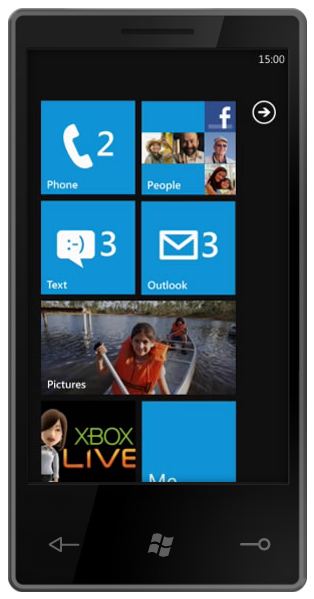
After look at the picture of Windows Phone 7 Series interface and read some detail about it, I want to say “Windows Mobile development team finally did something great.” The concept about the interface is simple and nice, no more old fashion style like previous version of Windows Mobile. Great job!

Demo of Windows Phone 7 Series can be found here.

I guess Windows Phone 7 Series will be the killer app for Microsoft in smart phone market. But wait, when will it release? End of this year! Gosh, aren’t this is a little too late? With more than 6 months time, new version of Android and iPhone might already hit the market with all the improvement to counter attack Windows Phone 7 Series. Future more, the hype of Windows Phone 7 Series might not be able to last until the end of the year. Is Microsoft telling the world about this good news a bit too early?

With just interface improvement and no other special or unique feature, it might not hold the competitors for a long time. Let’s hope Microsoft will give us some surprises and keep the hype till the release of Windows Phone 7 Series. Silverlight 4 for Windows Phone 7 Series? Xbox integration? Microsoft releasing their own mobile phone? I do like the design of the phone use by Microsoft to demo Windows Phone 7 series. Let us just wait and see.

by Ooi Keng Siang

Congress

My First Hand-on Google Buzz

I just received a Gmail update. Google Buzz is there in my account! I finally can get a taste of the Buzz. Well, basically there are nobody in my buzz exp one of my friend Matthew who just got his buzz today.

The first feeling I got from buzz was… another Twitter! Buzz allow me to post status update, follow others updates, let others follow my updates (follower) and etc. It also have a long list of following friend’s status update. (See the screenshot bellow) Aren’t it really look like a Twitter? Well, the different might be I can share picture, video and more other thing in there (now sound like Facebook’s wall post). Oh ya, there is no number of character limitation in buzz. Unlike twitter or facebook, buzz automatic follow other that they think user might interested when user just got their buzz account, I think it is according to the contact book in gmail. Sound scary huh? What happen if buzz automatically let your boss follow your buzz?

I want to said I don’t feel anything special about Google Buzz. Well, it might something for those who own a gmail account but without a twitter account. For me, all my updates and following updates are in Twitter. I don’t want another similar social networking tool. I don’t really want to update my Twitter and Buzz every time (double work).  Maybe a simple plug-in that allow my twitter status to be duplicated to buzz will be more better. (just like Facebook). Temporary there aren’t exist any plug-in for that, so I might just left buzz there until I found something interesting that buzz offer.

by Ooi Keng Siang

Google AI Challenge 2010

Google AI Challenge is a competition organize by University of Waterloo Computer Science Club and Sponsor by Google. The competition will test competitor’s AI skill in writing algorithm to beat others in Tron game. It sound just like those Robotic competition but this one is in virtual world purely with software/programming only.

Tron

Each competitor will represent their own countries and fight with others. It sound very much like Microsoft Imagine Cup, Algorithm category (too bad the category was already drop). If you think you are great in AI, why not give it a try, you might become the hero of the country. 🙂

Source:
http://csclub.uwaterloo.ca/contest/
http://googleforstudents.blogspot.com/2010/02/2010-ai-challenge.html

Develop Software Application to Send & Receive SMS

After knowing our team project, some of my friends interested on how to develop a software application to send and receive SMS, just like the one in our project. I have been explaining to them the way I know and the advantages and disadvantages of each way. I guess keep on repeat explaining to each of my friend when they ask was not a good way, so I plan to share it through my blog post. I guess this knowledge is very useful for those who want to join upcoming Imagine Cup because mobile penetration rate is very high compare with internet access.


Basically, I know 3 way of sending and receiving SMS through application.


SMS Server Toolkit

This toolkit is develop by Microsoft Research Lab India that allow application to send and receive SMS through Windows smartphone (require at least Windows Mobile 5.0).

Advantages:

  • Easy to configure for .NET application.
  • Build-in easy to use function (Example: bulk SMS using Excel)
  • Free.

Disadvantages:

  • Lack of documentation to setup.
  • Only support .NET language.
  • Required a Windows smartphone.
  • Limited number of SMS can be send and receive at the same time.
  • Maybe buggy.

Link: http://research.microsoft.com/en-us/downloads/2bdeb3c6-9945-4804-a9bc-0d53704d35da/default.aspx


SMS Lib

A free java base library that allow application to send and receive SMS through GSM modems capable phone (Most mid-end and high-end phone nowadays are GSM modems capable phone).

Advantages:

  • Support Java and .NET language. (.NET part is still in beta).
  • Require only mid-end mobile phone.
  • Free.

Disadvantages:

  • Hard to understand the setup document.
  • Function call is not easy to understand at the first try.
  • Limited number of SMS can be send and receive at the same time.

Link: http://smslib.org/


SMS Service Provider

You can purchase a SMS service from provider like WebSMS2U. You can send SMS by connect to their service through HTTP call.

Advantages:

  • Easy to setup (No setup require actually).
  • Send and receive large number of SMS at the same time.
  • Suitable for all kind of languages.

Disadvantages:

  • Require internet access.
  • Not free and require to pay for the service (expansive for low-budget project)
  • Required a web server if you want to receive SMS (A web server with domain name, not localhost).

Link: http://www.websms2u.com/


I Hope this information can be helpful for those who are developing software application that utilize SMS functionality.

by Ooi Keng Siang