MouseHunt AutoBot 1.6 Updated

Due to the demand of the script and King’s Reward is back to MouseHunt, I’m force to release new update very frequently in a day. The latest script will stop when encounter king’s reward due to MouseHunt 3.0 (Longtail) require player to resolve the captcha first no matter how long the player had idle in the game. I’m still thinking a way to solve this problem in order to proceed hunting. Do leave me a comment if you think of any. If you miss out a lot of version, check out the changelog for more detail. Stay tune for more update.

Script Description

MouseHunt AutoBot is a short and simple user script to automatic sound the hunter horn in MouseHunt application in Facebook with MouseHunt version 3.0 (Longtail) supported. Time of next hunter horn and trap check will show on the webpage title. The time of the next hunter horn will automatically detected without refreshing the page again. Users can customize the script according to their need by themselves such as add extra random time delay before sounding the hunter horn (Please look for UserPreferenceSetting in the script). Part of the script is actually base on Facebook MouseHunt Game Auto Horn Blower.

Main Features

  • Support Mousehunt version 3.0 (Longtail).
  • Automatically sound horn when time’s up with extra random time define by user.
  • Simulate mouse click on the horn image instead of URL sound horn.
  • Automatically detect and retrieval the next horn time without refreshing the page.
  • Cross-browsers support.

Browser Support

  • Mozilla Firefox with Greasemonkey add-on (Tested with Mozilla Firefox 3.6.3 with Greasemonkey 0.8 add-on)
  • Opera (Tested with Opera 10.53)
  • Google Chrome (Tested with Google Chrome 5.0)

Precautions

  • Use this script at your own risk because AutoBot script is again the rule set by MouseHunt, that is users are not allowed to use any tool to automate sounding the hunter horn.
  • Do uninstall any other MouseHunt auto sound horn scripts before install this script to prevent conflict with this script.

Known Issues

  • The script is not fully tested out due to the demand of the script for MouseHunt 3.0 update.
  • King’s Reward part of the script did not fully tested due to lack of data.
  • The script will stop when encounter king’s reward due to MouseHunt 3.0 (Longtail) require user to resolve the captcha first no matter how long the user had idle in the game.
  • After the horn is sound, the next horn time will set to 900 seconds and recalculation will be done on background and update the timer later. It is not a fix timer.

Download

MouseHunt AutoBot at userscript website

Changelog

Version 1.6

  • The script now stop on King’s Reward instead of refreshing after the countdown end because new implementation of MouseHunt must resolve King’s Reward in order to continue hunt.
  • Add an option to disable trap check.

Version 1.5

  • Bug fix play the sound when king’s reward time.

Version 1.4

  • Add a timer display on top of mousehunt page (show delay time as well).
  • Add timer for King’s Reward.
  • Bug fix timer display incorrectly.

Version 1.3

  • Simulate mouse click on the horn image instead of URL sound horn.
  • Automatically detect and retrieval the next horn time without refreshing the page.

Version 1.2

  • Fix script unable to execute if user click from bookmark.

Version 1.1

  • Added extra random time delay function.
  • Improve the time format display on the title.

Version 1.0

  • First release.

by Ooi Keng Siang via Ooiks’s Blog

MouseHunt AutoBot Released

MouseHunt AutoBot is A short and simple script to automatic sound the hunter horn designed for MouseHunt 3.0 (Longtail). Time of next hunter horn and trap check will show on the webpage title. Users can customize the script according to their need by themselves such as add extra random time delay before sounding the hunter horn (Please look for UserPreferenceSetting in the script). Part of the script is actually base on Facebook MouseHunt Game Auto Horn Blower.

Currently the script support Mozilla Firefox with Greasemonkey add-on (Tested with Mozilla Firefox 3.6.3 with Greasemonkey 0.8 add-on), Opera (Tested with Opera 10.53) . Yet to tested it out on Google Chrome, but theoretically it should work with Google Chrome too.

The script is not fully tested out due to the demand of the script for MouseHunt 3.0 update. King’s Reward part of the script did not tested at all due to MouseHunt currently disable King’s Reward. Do uninstall any other mousehunt auto sound horn scripts to prevent conflict with this script. Do drop a message if you discover any bugs. This script is still new, many testing and update will be carry out. Stay tune for more update.

For more information and download, visit visit userscripts.org website.

by Ooi Keng Siang via Ooiks’s Blog

Longtail Break MouseHunt Travel Advisory 1.2

With the release of MouseHunt 3.0 (Longtail), MouseHunt Travel Advisory 1.2 is not longer function. It may take sometime for me to fix it out. The travel from other location back to Town of Gnawnia is now charge for certain among of gold but if follow the Larry’s travel then it cost no gold. I really need some time to redesign the whole script. Stay tune till then.

by Ooi Keng Siang via Ooiks’s Blog
MouseHunt Travel Advisory 1.2 Release

Mousehunt Travel Advisory 1.2 release update new map Balack’s Cove travel cost information.

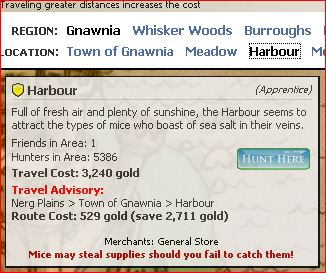
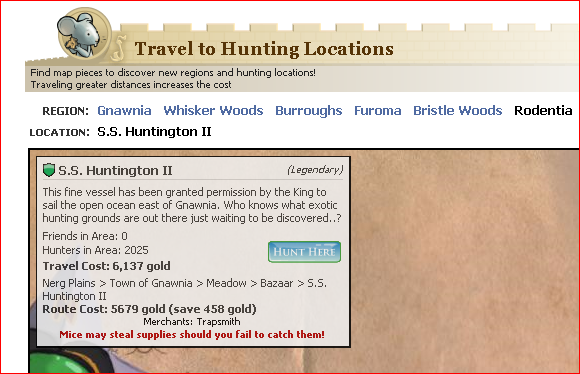
MouseHunt Travel Advisory is a user script that build specially for MouseHunt application in Facebook. It is able to calculate the cheapest route from player’s current location to location the player wish to travel to. It work similar to Pooflinger’s Travel Planner, but this script read player location directly from the application and embed the result directly into application instead of opening another tab for travel planner.

Travel advisory script load is whenever player open the travel page in MouseHunt after they installed the script. It will search and get all locations that is accessible by the player. It will then calculate the cheapest route to player’s selected destination base on locations that are accessible by the player. This allow the script to automatic route through Forbidden Grove when it is open (if necessary) and avoid Forbidden Grove when it is close. It will also avoid location that unable travel by the player currently (such as missing map piece). All travel cost are base on MouseHunt Wiki.

Currently the script support Mozilla Firefox with Greasemonkey add-on (Tested with Mozilla Firefox 3.6 with Greasemonkey 0.8 add-on), Opera (Tested with Opera 10.50) and Google Chrome (Tested with Google Chrome 4.1).

For more information and download, visit MouseHunt Travel Advisory website or visit userscripts.org website.

By Ooi Keng Siang

MouseHunt Travel Advisory Script Hit 100 Download

Yeah, Mousehunt Travel Advisory script hit 100 downloads today on userscript.org. This number is just merely from userscript.org and did not include download from my homepage. Although 100 hits is just small amount for others, but this is a great milestone for me to continue move forward.

It has been almost a month since I write this script from group up. From zero knowledge about user script and very little theoretical knowledge about javascript until the script complete. A way to polish my javascript skill huh? From installing different browsers to test the script for portability, until today I used all 3 browsers for my daily life. Sound a bit crazy huh? Thanks to my friend’s help in finding bug in the script so that I can fix all the bugs in the script. Testing is very important ya! Well, I can said by writing this script, I have learned a lot of thing where I can’t found in class room.

Well, let’s stop talking about my long winded story, I guess no one is interested. Let’s get something to work. Shall I add auto travel function in the script? One click button and the script will help you travel using the cheapest path to destination. I wonder this is violating the term & condition of MouseHunt or not. Another idea is maybe I should just add (not replace!) the feature like travel planner where user can select the departure location and destination they want, because some of the users are actually planing future traveling before they reach that location. So what do you think? Come tell me in the comment!

MouseHunt longtail (version 3.0) is releasing soon, I hope it won’t completely screw up the script. Even it did screw up the script, I’m ready to fix it as soon as possible.

Don’t know about MouseHunt Travel Advisory script? Check it out at userscript.org website or my homepage.

by Ooi Keng Siang

MouseHunt Travel Advisory 1.1 Release

Mousehunt Travel Advisory 1.1 release will fix the bug that cause Firefox browser keep on reload travel page whenever user click on a new location.

MouseHunt Travel Advisory is a user script that build specially for MouseHunt application in Facebook. It is able to calculate the cheapest route from player’s current location to location the player wish to travel to. It work similar to Pooflinger’s Travel Planner, but this script read player location directly from the application and embed the result directly into application instead of opening another tab for travel planner.

Travel advisory script load is whenever player open the travel page in MouseHunt after they installed the script. It will search and get all locations that is accessible by the player. It will then calculate the cheapest route to player’s selected destination base on locations that are accessible by the player. This allow the script to automatic route through Forbidden Grove when it is open (if necessary) and avoid Forbidden Grove when it is close. It will also avoid location that unable travel by the player currently (such as missing map piece). All travel cost are base on MouseHunt Wiki.

Currently the script support Mozilla Firefox with Greasemonkey add-on (Tested with Mozilla Firefox 3.6 with Greasemonkey 0.8 add-on), Opera (Tested with Opera 10.50) and Google Chrome (Tested with Google Chrome 4.1).

For more information and download, visit MouseHunt Travel Advisory website or visit userscripts.org website.

Special thanks to Yew Liang that discover the bug in this script.

By Ooi Keng Siang

MouseHunt Travel Advisory 1.0 Release

After more than 2 weeks of learning user script from ground up and testing the user script, I’m proud to announce the release of MouseHunt Travel Advisory script created by me.

MouseHunt Travel Advisory is a user script that build specially for MouseHunt application in Facebook. It is able to calculate the cheapest route from player’s current location to location the player wish to travel to. It work similar to Pooflinger’s Travel Planner, but this script read player location directly from the application and embed the result directly into application instead of opening another tab for travel planner.

Travel advisory script load is whenever player open the travel page in MouseHunt after they installed the script. It will search and get all locations that is accessible by the player. It will then calculate the cheapest route to player’s selected destination base on locations that are accessible by the player. This allow the script to automatic route through Forbidden Grove when it is open (if necessary) and avoid Forbidden Grove when it is close. It will also avoid location that unable travel by the player currently (such as missing map piece). All travel cost are base on MouseHunt Wiki.

Currently the script support Mozilla Firefox with Greasemonkey add-on (Tested with Mozilla Firefox 3.6 with Greasemonkey 0.8 add-on), Opera (Tested with Opera 10.50) and Google Chrome (Tested with Google Chrome 4.1).

For more information and download, visit MouseHunt Travel Advisory website.

Special thanks to Yew Liang, Matthew Phiong and Koekoe for helping me beta test the script.

By Ooi Keng Siang

My First User Script – MouseHunt Travel Advisory

The script is already ready, you can found it at MouseHunt Travel Advisory website or visit userscripts.org website.

After more than a week of spending my free time learning and working on user script (also call Greasemoneky script), I finally come out a prototype of MouseHunt Travel Advisory (a temporary name given to my created script). This script build specially for MouseHunt application in Facebook. It is able to calculate the cheapest route from player’s current location to location the player wish to travel to. It work similar to Pooflinger’s Travel Planner, but this script read player location directly from the application and embed the result directly into application instead of opening another tab for travel planner.

Well, this script may not sound so good for hunter who own a lot of gold, but this script should be good enough for hunter who want to save as much as gold yet lazy to open another tab to look for alternative route when travel.

Currently, I was only able to complete the AJAX part (require the whole web page is fully loaded before player click on any location) and yet to complete the HTML part (doesn’t not require the whole web page loaded before player click on any location). The script also face some performance issue where travel to location required a lot of gold such S. S. Huntington II or Dracano (the script need to loop through a lot of route), but I had found a solution for this. The script should be able to complete in this few days (if I’m hardworking enough).

Now, who said play game is bad for learning. Javascript, routing algorithm, performance measurement and… there are many else we can learn from a game!

by Ooi Keng Siang