Windows Phone: Unzip / Extract Compressed Files for Silverlight

I’m don’t really understand why compress or zip function was not added to Silverlight or Windows Phone since the Silverlight package or Windows Phones xap file was actually a zip file. Windows Phone will need to unzip all file download from marketplace in order to install in the phone. While I’m looking for a third party library to unzip file in my Windows Phone app, I come across this REALLY small unzip utility for Silverlight, which re-use the existing functions in Silverlight to done the job. Great, this is just what I looking for and the best part of it, the size is really small. It is just a C Sharp file!

A very simple tutorial for REALLY small unzip utility for Silverlight was provided on his blog but I found a missing function in the code. The GetFileNamesInZip can’t be found by Visual Studio. After taking a quick look in the source file, I found out that the function name was changed to FileNamesInZip instead. Below are the same example but with corrected function name call instead.

private void LoadZipfile()
{
    WebClient c = new WebClient();
    c.OpenReadCompleted += new OpenReadCompletedEventHandler(openReadCompleted);
    c.OpenReadAsync(new Uri("http://www.mydomain.com/myZipFile.zip"));
}

private void openReadCompleted(object sender, OpenReadCompletedEventArgs e)
{
    UnZipper unzip = new UnZipper(e.Result);
    foreach (string filename in unzip.FileNamesInZip())
    {
        Stream stream = unzip.GetFileStream(filename);
        StreamReader reader = new StreamReader(stream);
        string contents = reader.ReadToEnd();
        MessageBox.Show(contents);
    }
}


Download REALLY small unzip utility for Silverlight  

by Ooi Keng Siang via Ooiks’s Blog

 

Stop Facebook Like Video 1.1: Support More Websites

I found more website that are posting YouTube video on their website and force visitor to click on the like button before they can watch the video. I had update the script to support 2 more websites.  Let’s watch the video without posting rubbish on the Facebook wall!


Script Description

Have enough for those website that force you to like the video before you can watch them? The worse part is the video will post on your Facebook wall without you knowing what is the content of the video at the first place.
This script can help you get rip of those trouble. When you click on the video link post by your friends, it will first load up the website and then the script will automatically redirect you to YouTube that playing that video bypass the like button. You no longer need to like the video first before you watch it and you can make sure your Facebook wall is clean without rubbish!


Continue reading Stop Facebook Like Video 1.1: Support More Websites

Stop Facebook Like Video: No Like Before I Watch It

I had enough for those Chinese language website like vdoprince and vdobuzz that force you to like the video before you can watch them. All video from their website are video from YouTube, what make them force us to click on the like before we even watch that video. The worse part is the video will post on your Facebook wall without you knowing what is the content of the video at the first place.

So I had enough of this and I plan to stop this. I write my own script to redirect to YouTube whenever I click on those video link. They are not getting any of my like! Problems?


Script Description

Have enough for those website that force you to like the video before you can watch them? The worse part is the video will post on your Facebook wall without you knowing what is the content of the video at the first place.
This script can help you get rip of those trouble. When you click on the video link post by your friends, it will first load up the website and then the script will automatically redirect you to YouTube that playing that video bypass the like button. You no longer need to like the video first before you watch it and you can make sure your Facebook wall is clean without rubbish!


Continue reading Stop Facebook Like Video: No Like Before I Watch It

MTGBugs: Now Available on Windows Phone Marketplace

MTGBugs is a comprehensive app or tool for Magic the Gathering player. It integrate all kind of different tools which required by Magic players in one single app. For example life counter, dice roll, offline cards database, online card pricing, deck builder analysis, latest news update and many more. MTGBugs currently is the only app in Windows Phone marketplace with the most complete features builds into it.

MTGBugs main features include:

  • Game tracker include life and poison counter, game timer, mana pool counter, random dices
  • Commander format support up to 12 players with commander cast counter and achievements check list
  • Offline cards database with 20,000+ cards collection and online card pricing integrated (All prices courtesy of TCGPlayer.com)
  • Decks builder with up to date winning deck lists and automatic analysis tool build in
  • Wishlist and direct purchase through online shop from TCGPlayer.com
  • Online news direct from Daily MTG, StarCityGames, ChannelFireball and TCGPlayers
  • Photo capture and sketching tool to record opponent hand’s cards

Continue reading MTGBugs: Now Available on Windows Phone Marketplace

Windows Phone: Ready for the Marketplace in Malaysia

You may have notice Malaysia country is now listed in Windows Phone website. If you go to the marketplace, you can now search app that is available in Malaysia marketplace. This mean that the Windows Phone marketplace is ready for Malaysia consumers. Malaysia developers hold your horse, app submission to App Hub directly is not ready yet and you will still need to go through third party currently, check out my previous post.

The very first thing that piss me off is I can’t change the language to English if I selected Malaysia as the country in the website. Malay language was the only language provided. Why? Running translation in my head full speed while browsing the site is killing my brain cell. Fix this please! OK! enough, back to the topic.

You may found there are lot fewer apps in Malaysia marketplace compare with US marketplace. This is because many apps was submitted before Malaysia marketplace is ready for distribution. This mean that unless developers of those missing apps resubmit their app and select distribution to Malaysia, else it won’t be available to Malaysia marketplace. This doesn’t sound bad at all, because usually app that no longer updated are some useless app, so this can pretty much filter a lot of useless apps in Malaysia marketplace.

As for now Malaysia developers still need to submit their apps through third party like Yalla Apps in order to publish their apps to Malaysia marketplace and other country marketplace. Some developers still refuse go into Windows Phone development because they worry what will happen to their apps once the marketplace is fully open for developers in Malaysia and they can submit their app direct through App Hub. From what Microsoft and Yalla App done previously, developers can transfer their app to App Hub when it is fully open. Check out this post. So this is the best time to jump into Windows Phone development.

The news has been confirmed at Windows Phone Blog.

I’m still waiting for one of my fully developed app to get through the app submission and my new Windows Phone to ship to my hand. Such a long wait before I can play the fun out of it.

By Ooi Keng Siang via Ooiks’s Blog

Windows Phone: Preload Existing Data to SQL CE Database

Ever since Windows Phone 7 Mango update, you can run a small database call SQL CE in your Windows Phone app. The SQL CE database in Windows Phone use code first approach instead of the creating table first like what you did in your desktop or web development. This mean you will write the classes for your table in database and all the table will be generated on runtime when you run your app on the phone. Yes, you can’t manually create the table and insert the data into the database during your development.

Although the database has all the necessary functions basic function that you need, but if you have a large set of data that you want to insert into the database then you will have a problem. Generate a large set of data and insert into the database when user run your app for the first time was a bad idea, because it might take too long time and it will create a bad first impression of user when they first use your app. You can use XML instead of SQL CE, but on a large data set, XML performance is much slower than SQL CE.

In my case is, I have a huge XML file for my Windows Phone app (over 40 MB). Accessing to the XML file take me more than 20 second to initialize, it was a pain. Finally I found an alternative way to insert a large volume of data to the database. first I need to create a new Windows Phone project and I program it to convert my huge XML data to the SQL CE database (Phew, it take me 30 minutes to run the conversation). Then, I copy out the database from isolated storage and put it into the project I want. Done, my app can now direct access to the database and save ton of startup time.

For step by step how to do this, please refer to How to: Deploy a Reference Database with a Windows Phone Application

by Ooi Keng Siang via Ooiks’s Blog

Windows Phone: ListPicker Problems and Solutions

In this post, I’m going to share my experience dealing with ListPicker which come from Silverlight for Windows Phone Toolkit (Sept 2010 edition). ListPicker is a very useful control to replace combo box type of control in Windows Phone, but currently version is too buggy and lot of work around needed. Here I’m share about the problem I face when using ListPicker and solution that I apply. Hope you can find it useful.


ListPicker Can’t Expend or Open Problem

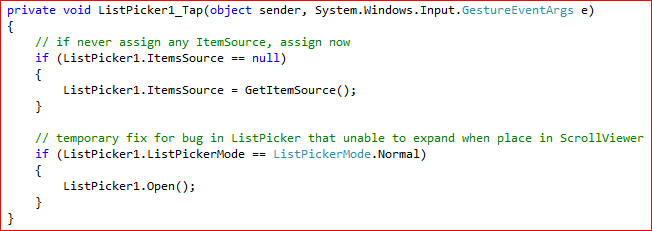
This is a known bug in ListPicker. If you place the ListPicker in a ScrollViewer and the ListPicker can’t open in the full mode when user tap on it. The solution for this is manually open the ListPicker in FullMode when tap event is rise.


ListPicker Unable to Assign SelectedItem on Load / After User Select in Full Mode

Often we want to pre-select a SelectedItem in ListPicker which the application saved when the page load. The problem is if set  SelectedItem in page contractor like other controls, it still remain selecting the first item instead because it wasn’t loaded when you assigning  SelectedItem. If set on  PhoneApplicationPage_Loaded, it will work for the first time but when user tap on ListPicker and select a new value in full mode, the ListPicker will still remain the same SelectedItem. This is because  PhoneApplicationPage_Loaded will be call every time the page is load which mean when ListPicker full mode closed,  PhoneApplicationPage_Loaded will be call again and reset ListPicker SelectedItem again.

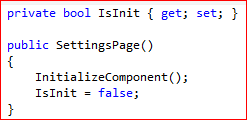
The solution for this is to put the SelectedItem in PhoneApplicationPage_Loaded event but make sure it is call one time only instead every time PhoneApplicationPage_Loaded is called. One way to do this use a class properties to keep track whatever ListPicker is initialized or not.


ListPicker Slow Performance Issue

If you have multiple ListPicker in the same page, you might notice the page will become unresponsiveness for the first one or two seconds when user navigate to the page. This is because multiple ListPicker take quite some time to load if you assign ItemSource in ListPicker during page constructor, on PhoneApplicationPage_Loaded event or on  OnNavigatedTo event. Setting  the CacheMode to BitmapCache won’t have solving the problem because it still need to load it for the first time.

I need the page to be responsiveness as soon as user navigate to the page. The only solution I can come out to solve this problem is to only load ItemSource to ListPicker when ListPicker is tap. Although this will cause ListPicker to open slower when user tap on it, but it is OK for me since I had more than 4 ListPicker and those ListPicker is just optional. Make sure you only assign ItemSource once instead of every time user tap on it.


That all for ListPicker currently. I hope all this information is useful for any one who face problem on ListPicker.


by Ooi Keng Siang via Ooiks’s Blog
Imagine Cup 10th Anniversary Sweepstakes

The world’s premier student technology competition, Microsoft Imagine Cup is celebrating it’s 10th Anniversary by making joining the Imagine Cup community even more fun and rewarding.  By registering yourself at Imagine Cup offcial website, you will stand a chances to win a Kinect, a PC or an all-inclusive trip to Australia for the 2012 Imagine Cup Worldwide Finals in Sydney. If you haven’t register yourself, register today and start changing the world today!


Prizes

  • Weekly Prizes: Kinect for Xbox 360. (6 winners per week)
  • Grand Prize: An all-inclusive trip to Australia for the 2012 Imagine Cup Worldwide Finals in Sydney. Includes (1) winner and guest. Approximate Retail Value (ARV) $10,000.
  • Prize for Competitors: Sony Vaio PC and 3D camcorder bundle. (2 winners)


Easy steps to enter

  1. Register HERE. Please provide #10 as your referral code.
  2. Read HERE about the available competitions and challenges and Sign Up to compete in your favorite category.
  3. You’re done! You are now eligible to win a Kinect and a trip for you and a friend to Australia!
  4. Want to be eligible for the Competitor Prize? Become a Competitor and take the next step by taking a quick quiz or submitting and entry.

*Note: If you complete Step 1 without entering #10 as the referral code you will not be able to enter it at a later stage.


This Sweepstakes starts at 00:01 GMT on February 8, 2012, and ends at 23:59 GMT on March 13, 2012 (“Entry Period”). So you better act first. Oh before I forget, it is open for student only. Yes, student with age 16 and above only. For more information of the  sweepstakes, visit Imagine Cup official post.


by Ooi Keng SiangMSPSMT via Ooiks’s Blog

Tell Us Your Imagine Cup Story

Are you a previous Imagine Cup competitor? We want to share with the world your journey through the Imagine Cup competition. Your story, if selected, will be posted on the Imagine Cup website or we may contact you to collect more information. Each month we will feature as many new stories as we can.


Please answer the following questions and send them to stories@imaginecup.com, and don’t forget to include a picture of you and your team. All answers need to be in English, please.

1. Why did you choose the Imagine Cup competition?
2. What inspired you to create your project?
3. What year did your team compete and what was your team name?
4. What are you doing now with your project?


Want to know more about previous Imagine Cup competitor’s story? You can always find it out at Imagine Cup official website. So share with us your story. If you haven’t join Imagine Cup before, take a look at their story and create your own story by joining Imagine Cup today.


by Ooi Keng SiangMSPSMT via Ooiks’s Blog 

Meet The Imagine Cup Grants Winners

The 4 winning teams of first ever Imagine Cup Grants was announced on Microsoft Citizenship Blog. The winners were in Davos to meet with Microsoft Chairman, Bill Gates and to participate in a roundtable discussion on the challenges and opportunities facing young people today. The Imagine Cup Grants program is a three-year, $3 million competitive grant program to help Imagine Cup participants take their ideas and their projects and transform them into a business or nonprofit that can bring the benefit of their technology to the communities that need it most.

Here’s some more about the four winning teams:


Team Apptenders (Croatia)

Project Name:  KiDnect

Team Members: Ivan Antonic, Ivan Borko, Karmela Bresan, Dominik Tomicevic

KiDnect is a Kinect-based solution for on-premise and remote physical therapy for children, especially those born with Cerebral Palsy. This software has the ability to monitor a child’s exercises to ensure they are being completed correctly, and then provides statistical analysis to the therapist. Team Apptenders hopes to add multilingual interfaces in order to integrate additional sensors for limb rotation monitoring and advanced data analysis.


Team Falcon Dev (Ecuador)

Project Name: SkillBox

Team Members: José Vicente Anilema Guadalupe, Gerardo Francisco Pérez Layedra, Henry Javier Paca Quinaluiza, Juan José Morales Ruiz

SkillBox is an affordable solution to help children who are hearing impaired by translating all audio received from a teacher in a classroom into sign language. A wireless headset captures the sound, sends it to the computer and SkillBox then shows the corresponding sign for the word or phrase. Team Falcon Dev hopes to take their first step in making SkillBox available to children by selling their technology solution to public schools in Ecuador.


Team OaSys (Jordan)

Project Name: Horizon

Team Members: Hani AbuHuwaij, Mohammad Azzam, Monir Abu Hilal, Mohammad Saleh, Yousef Wadi

Horizon is a software and hardware system that allows people who do not have use of their hands/arms to use a computer. Specifically, it tracks head movements and translates these movements into mouse movements. Users get full control of a computer and a cellphone, and can browse the internet, type and connect with ease and at a low cost. Team OaSys hopes to improve the software stack by optimizing and adding features, pilot client lab preparations and hire sub-contractors.


Team LifeLens (United States)

Project Name: LifeLens

Team Members: Tristan Gibeau, Cy Khormaee, Wilson To, Jason Wakizaka, Helena Xu

Lifelens is an innovative point-of-care tool to diagnose malaria using an augmented Windows Phone application. The project addresses the unacceptably high child mortality rates caused by the lack of detection and availability of treatment of malarial diseases. Team Lifelens is ready to develop their project for launch. They will use the investment for distribution of their devices, subsidizing the phones and field testing.


Full story: http://blogs.technet.com/b/microsoftupblog/archive/2012/01/27/meet-the-imagine-cup-students-turned-social-entrepreneurs.aspx 


by Ooi Keng SiangMSPSMT via Ooiks’s Blog