As you all know Firefox screw the script again. During version 1.23, Firefox update cause unsafe windows broken down and I force to use Content Global Reader in version 1.24. Now Content Global Reader stop working in Firefox when MouseHunt running in Facebook frame. So I use back unsafe windows which now can be used again. What a joke.
Thing is running now. I also fix some minor problems when player sound the horn manually. Check the changelog for more detail. Sorry, no mobile page version supported for this version yet, as I’m too busy with other stuff. It will be a long delay for this feature to come. No worry, I will still spend some of my time to fix some major bug if there is any.

Script Description
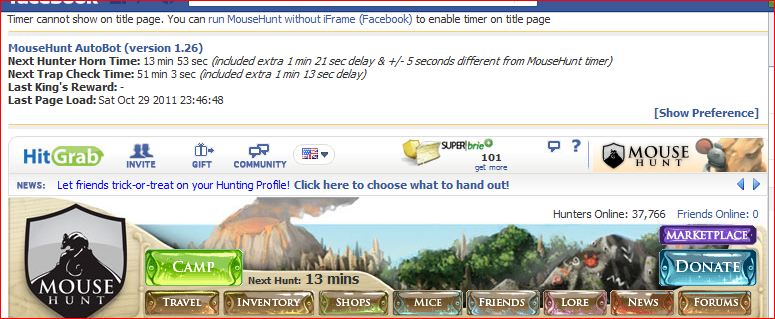
MouseHunt AutoBot is an advance user script to automate sounding the hunter horn in MouseHunt application in Facebook, Hi5 and offside MouseHunt page with MouseHunt version 3.0 (Longtail) supported and many other features. In a simple word, bot for MouseHunt. Time of next hunter horn and trap check will show on the web page title. The time of the next hunter horn will automatically detected without refreshing the page again. Users can customize the script according to their need by themselves such as add extra random time delay before sounding the hunter horn. Users can choose to bot safety with many safety check features which act like a human, or bot aggressively. Part of the script is actually base on Facebook MouseHunt Game Auto Horn Blower.
Main Features
- Support MouseHunt version 3.0 (Longtail).
- Automatically sound horn when time’s up with extra random time define by player.
- Simulate mouse click on the horn image instead of URL sound horn.
- Automatically detect and retrieval the next horn time without refreshing the page.
- Show next hunter horn and others timer in the page and title.
- Stop bot when player move to location different than pre-define location.
- Safety features such as check horn image is visible or not before sounding the horn. (bot can sound the horn without the horn appear first if aggressiveMode is on)
- Cross-browsers support.
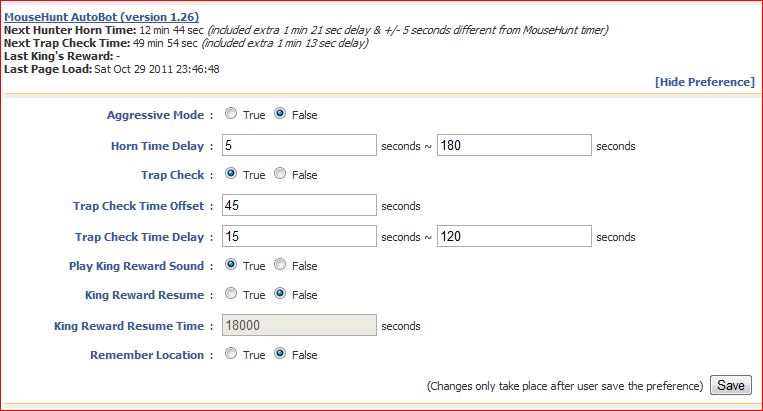
- Set preference setting such as horn delay time directly in the game.

Platform Support
Browser Support
- Mozilla Firefox with Greasemonkey add-on (Tested with Mozilla Firefox 7.0.1 with Greasemonkey 0.9.8 add-on)
- Opera (Tested with Opera 11.50)
- Google Chrome (Tested with Google Chrome 15.0)
Precautions
- Use this script at your own risk because AutoBot script is again the rule set by MouseHunt, that is users are not allowed to use any tool to automate sounding the hunter horn.
- You are reminded not to use your real name or the same name you use in Facebook to post / reply discussion here because some one might go after you and please don’t ask me why I use my real name here.
- Do uninstall any other MouseHunt auto sound horn scripts before install this script to prevent conflict with this script.
Known Issues
- Script timer is running faster than MouseHunt provided timer, this is because MouseHunt programmed the timer in a way to have +/- 5 seconds delay.
- The script will pause when encounter king’s reward due to MouseHunt 3.0 (Longtail) require user to resolve the captcha first no matter how long the user had idle in the game.
- The page may have minor refresh due to Facebook / Hi5 fetching data from server, it was not related with the script.
- Google Chrome will playing King’s Reward sound through streaming but Opera and Firefox will play directly from the script.
How to Install User Script
Download
Download through userscript website.
Changelog
Version 1.26
- Fix Firefox unable to run correctly in Facebook frame.
- Fix page refresh unnecessary problem after player manually sound the horn.
- Fix automatically reset the timer after user sound the horn manually before the timer reach zero.
- Correct some spelling error.
by Ooi Keng Siang via Ooiks’s Blog






 Ooiks's Blog