MouseHunt AutoBot 1.18 (Facebook Recent Update Fix)

If you are player of MouseHunt in Facebook, you will notice the bot no longer running correctly since 2nd of April when the developer of MouseHunt release the new version of update that put MouseHunt in an iFrame. For those who don’t know what is iFrame, it is just another browser in a website that ease the development or update of MouseHunt in future. It is not a bot catch technique.

A lot of users have been showing support on my blog while I busy updating the script and testing. Thanks to you all. So may I now bring you all the latest version of AutoBot that fix this trouble. Please expect some bugs running around on your trap when you hunting because the script is tested less than 24 hours and without any King’s Reward encounter. Will keep on update the script if I found any bugs.
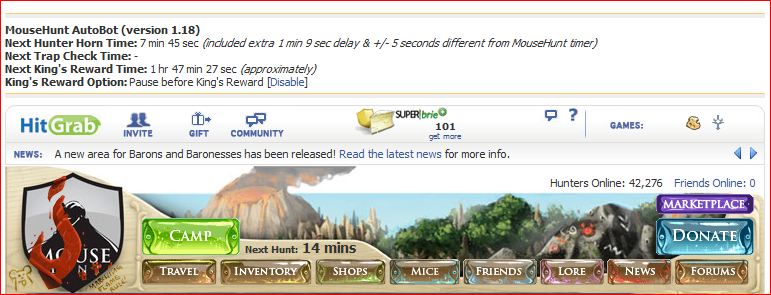
Script Description

MouseHunt AutoBot is an advance user script to automate sounding the hunter horn in MouseHunt application in Facebook, Hi5 and offside MouseHunt page with MouseHunt version 3.0 (Longtail) supported and many other features. In a simple word, bot for MouseHunt. Time of next hunter horn and trap check will show on the webpage title. The time of the next hunter horn will automatically detected without refreshing the page again. Users can customize the script according to their need by themselves such as add extra random time delay before sounding the hunter horn (Please look for UserPreferenceSetting in the script). Users can choose to bot safety with many safety check features which act like a human, or bot aggressively. Part of the script is actually base on Facebook MouseHunt Game Auto Horn Blower.

Main Features

  • Support Mousehunt version 3.0 (Longtail).
  • Automatically sound horn when time’s up with extra random time define by user.
  • Simulate mouse click on the horn image instead of URL sound horn.
  • Automatically detect and retrieval the next horn time without refreshing the page.
  • Show next hunter horn and others timer in the page and title.
  • Stop bot when player move to location different than pre-define location.
  • Safety features such as check horn image is visible or not before sounding the horn. (bot can sound the horn without the horn appear first if aggressiveMode is on)
  • Cross-browsers support.

Paltform Support

Browser Support

  • Mozilla Firefox with Greasemonkey add-on (Tested with Mozilla Firefox 4.0 with Greasemonkey 0.9 add-on)
  • Opera (Tested with Opera 11)
  • Google Chrome (Tested with Google Chrome 11.0)

Precautions

  • Use this script at your own risk because AutoBot script is again the rule set by MouseHunt, that is users are not allowed to use any tool to automate sounding the hunter horn.
  • You are reminded not to use your real name or the same name you use in Facebook to post / reply discussion here because some one might go after you and please don’t ask me why I use my real name here.
  • Do uninstall any other MouseHunt auto sound horn scripts before install this script to prevent conflict with this script.

Known Issues

  • Script timer is running faster than MouseHunt provided timer, this is because MouseHunt programmed the timer in a way to have +/- 5 seconds delay.
  • With Aggressive Mode enable, the script timer is running super faster compare with MouseHunt provided timer, this is because it is very aggressive!
  • The script will pause when encounter king’s reward due to MouseHunt 3.0 (Longtail) require user to resolve the captcha first no matter how long the user had idle in the game.
  • Timer will run slower / inaccurate if the browser is running resource hungry application such as flash game.
  • Pause before King’s Reward might not totally prevent player from encounter King’s Reward, if user modify the King’s Reward interval time or run the script half way (played mousehunt before in other computer within few hour before).
  • Opera web browser only able to play King’s Reward music once only instead of looping infinity.
  • Hi5 and Facebook platform will not show any timer on page title due to the limitation of iFrame problem.
  • Features related with King Reward’s is not tested properly due to lack of King Reward in a recent changes.

How to Install User Script

Download

Download through userscript website.

Changelog

Version 1.18

  • Fix script unable to run correctly on Facebook due to recent changes made MouseHunt application running in iFrame.
  • HTTPS feature removed due to Facebook no longer allow HTTPS connection to Facebook application.

by Ooi Keng Siang via Ooiks’s Blog

MouseHunt AutoBot 1.17 Broken in Facebook

Recently on first of April, MouseHunt Autobot 1.17 is not working on MouseHunt game in Facebook anymore. I’m working hard to fix the trouble. While waiting, you all can still run the same script on http://www.mousehuntgame.com/ using your Facebook account.

[Update] The script had been fixed. Check out here.

This is not an April’s Fool.

by Ooi Keng Siang via Ooiks’s Blog
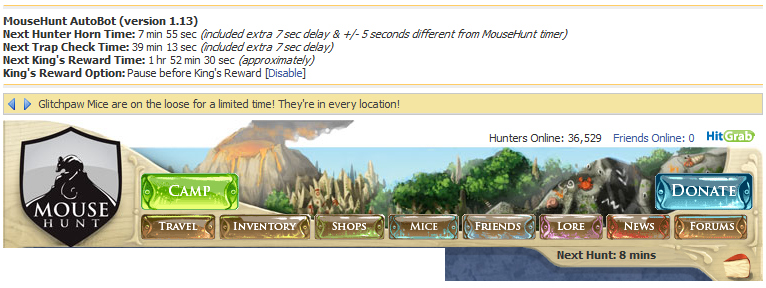
MouseHunt AutoBot 1.17 (MouseHunt Offside Page Supported)

Tired of MouseHunt in Facebook or Facebook got blocked in your network? Playing Mousehunt at Mousehunt offside page (http://www.mousehuntgame.com/) but need to sound the horn yourself alone? Now MouseHunt AutoBot 1.17 supported 3 major platforms, Facebook, Hi5 and MouseHunt Offside Page. Yes, all within a single script.

Version 1.17 also include some bugs fix for Hi5 platform users as well, such as problem playing sound during King’s Reward got fixed now! But nothing new for the Facebook users, sorry about that.  Check out the change log and known issue for the latest update on this version.

Script Description

MouseHunt AutoBot is an advance user script to automate sounding the hunter horn in MouseHunt application in Facebook, Hi5 and offside MouseHunt page with MouseHunt version 3.0 (Longtail) supported and many other features. In a simple word, bot for MouseHunt. Time of next hunter horn and trap check will show on the webpage title. The time of the next hunter horn will automatically detected without refreshing the page again. Users can customize the script according to their need by themselves such as add extra random time delay before sounding the hunter horn (Please look for UserPreferenceSetting in the script). Users can choose to bot safety with many safety check features which act like a human, or bot aggressively. Part of the script is actually base on Facebook MouseHunt Game Auto Horn Blower.

Main Features

  • Support Mousehunt version 3.0 (Longtail).
  • Automatically sound horn when time’s up with extra random time define by user.
  • Simulate mouse click on the horn image instead of URL sound horn.
  • Automatically detect and retrieval the next horn time without refreshing the page.
  • Show next hunter horn and others timer in the page and title.
  • Stop bot when player move to location different than pre-define location.
  • Safety features such as check horn image is visible or not before sounding the horn. (bot can sound the horn without the horn appear first if aggressiveMode is on)
  • Cross-browsers support.

Paltform Support

Browser Support

  • Mozilla Firefox with Greasemonkey add-on (Tested with Mozilla Firefox 3.6.13 with Greasemonkey 0.9 add-on)
  • Opera (Tested with Opera 11)
  • Google Chrome (Tested with Google Chrome 9.0)

Precautions

  • Use this script at your own risk because AutoBot script is again the rule set by MouseHunt, that is users are not allowed to use any tool to automate sounding the hunter horn.
  • You are reminded not to use your real name or the same name you use in Facebook to post / reply discussion here because some one might go after you and please don’t ask me why I use my real name here.
  • Do uninstall any other MouseHunt auto sound horn scripts before install this script to prevent conflict with this script.

Known Issues

  • Script timer is running faster than MouseHunt provided timer, this is because MouseHunt programmed the timer in a way to have +/- 5 seconds delay.
  • With Aggressive Mode enable, the script timer is running super faster compare with MouseHunt provided timer, this is because it is very aggressive!
  • The script will pause when encounter king’s reward due to MouseHunt 3.0 (Longtail) require user to resolve the captcha first no matter how long the user had idle in the game.
  • Timer will run slower / inaccurate if the browser is running resource hungry application such as flash game.
  • Pause before King’s Reward might not totally prevent player from encounter King’s Reward, if user modify the King’s Reward interval time or run the script half way (played mousehunt before in other computer within few hour before).
  • Opera web browser only able to play King’s Reward music once only instead of looping infinity.
  • Hi5 platform will not show any timer on page title due to the limitation of Hi5 platform.
  • The auto-focus answer box during King Reward’s and auto resume after king reward feature is broken currently.

How to Install User Script

Download

Download through userscript website.

Changelog

Version 1.17

  • MouseHunt Game website (mousehuntgame.com) supported.
  • Improve the script to recover from caugh in loop when something wrong with the browser prevent you sounding the horn.
  • Fix script problem that caugh in loop when the the horn fail to sound in sounding horn condition.
  • Fix script problem that continue to bot even when navigated out from hunt camp for Hi5 platform.
  • Fix script problem that showing the invalid link to facebook instead of Hi5 for Hi5 platform.
  • Fix script problem that unable to play sound when encounter king reward for Hi5 platform.

by Ooi Keng Siang via Ooiks’s Blog

MouseHunt AutoBot 1.16 (Hi5 Supported)

Finally, Hi5 mouse hunter can enjoy the fun together with Facebook mouse hunter! Now the script support both Facebook and Hi5 MouseHunt game application. Yes, one script support both platform. What are you waiting for, start the script and do the work!

The script is still relative new for Hi5, please expect some bug to run into your trap! Facebook mouse hunters are advised to use version 1.15.

Script Description

MouseHunt AutoBot is an advance user script to automate sounding the hunter horn in MouseHunt application in Facebook and Hi5 with MouseHunt version 3.0 (Longtail) supported and many other features. In a simple word, bot for MouseHunt. Time of next hunter horn and trap check will show on the webpage title. The time of the next hunter horn will automatically detected without refreshing the page again. Users can customize the script according to their need by themselves such as add extra random time delay before sounding the hunter horn (Please look for == Basic User Preference Setting (Begin) == in the script). Users can choose to bot safety with many safety check features which act like a human, or bot aggressively. Part of the script is actually base on Facebook MouseHunt Game Auto Horn Blower.

Main Features

  • Support Mousehunt version 3.0 (Longtail).
  • Automatically sound horn when time’s up with extra random time define by user.
  • Simulate mouse click on the horn image instead of URL sound horn.
  • Automatically detect and retrieval the next horn time without refreshing the page.
  • Show next hunter horn and others timer in the page and title.
  • Stop bot when player move to location different than pre-define location.
  • Safety features such as check horn image is visible or not before sounding the horn. (bot can sound the horn without the horn appear first if aggressiveMode is on)
  • Cross-browsers support.

Browser Support

  • Mozilla Firefox with Greasemonkey add-on (Tested with Mozilla Firefox 3.6.13 with Greasemonkey 0.8 add-on)
  • Opera (Tested with Opera 11)
  • Google Chrome (Tested with Google Chrome 9.0)

Precautions

  • Use this script at your own risk because AutoBot script is again the rule set by MouseHunt, that is users are not allowed to use any tool to automate sounding the hunter horn.
  • You are reminded not to use your real name or the same name you use in Facebook to post / reply discussion here because some one might go after you and please don’t ask me why I use my real name here.
  • Do uninstall any other MouseHunt auto sound horn scripts before install this script to prevent conflict with this script.

Known Issues

  • Script timer is running faster than MouseHunt provided timer, this is because MouseHunt programmed the timer in a way to have +/- 5 seconds delay.
  • With Aggressive Mode enable, the script timer is running super faster compare with MouseHunt provided timer, this is because it is very aggressive!
  • The script will pause when encounter king’s reward due to MouseHunt 3.0 (Longtail) require user to resolve the captcha first no matter how long the user had idle in the game.
  • Timer will run slower / inaccurate if the browser is running resource hungry application such as flash game.
  • Pause before King’s Reward might not totally prevent player from encounter King’s Reward, if user modify the King’s Reward interval time or run the script half way (played mousehunt before in other computer within few hour before).
  • Opera web browser only able to play King’s Reward music once only instead of looping infinity.
  • The script for Hi5 is still relative new. Please expect some catch some bug on your trap! Facebook mouse hunters are encouraged to use version 1.15 instead.

How to Install User Script

Download

Download through userscript website.

Changelog

Version 1.16

  • Hi5 social network supported.

by Ooi Keng Siang via Ooiks’s Blog

MouseHunt AutoBot 1.15 Updated

It had been more than half a year since I last updated this script. I’m back in action again! The latest version will fix the random trap check time which is different from player to player but the trap check will be disable by default as I realize many user still do not know how to edit the script.

Check out the change log for more information on the latest update. For those who do not know how to install, uninstall or edit the script, check out my latest post on how to install user script.

Script Description

MouseHunt AutoBot is an advance user script to automate sounding the hunter horn in MouseHunt application in Facebook with MouseHunt version 3.0 (Longtail) supported and many other features. In a simple word, bot for MouseHunt. Time of next hunter horn and trap check will show on the webpage title. The time of the next hunter horn will automatically detected without refreshing the page again. Users can customize the script according to their need by themselves such as add extra random time delay before sounding the hunter horn (Please look for UserPreferenceSetting in the script). Users can choose to bot safety with many safety check features which act like a human, or bot aggressively. Part of the script is actually base on Facebook MouseHunt Game Auto Horn Blower.

Main Features

  • Support Mousehunt version 3.0 (Longtail).
  • Automatically sound horn when time’s up with extra random time define by user.
  • Simulate mouse click on the horn image instead of URL sound horn.
  • Automatically detect and retrieval the next horn time without refreshing the page.
  • Show next hunter horn and others timer in the page and title.
  • Stop bot when player move to location different than pre-define location.
  • Safety features such as check horn image is visible or not before sounding the horn. (bot can sound the horn without the horn appear first if aggressiveMode is on)
  • Cross-browsers support.

Browser Support

  • Mozilla Firefox with Greasemonkey add-on (Tested with Mozilla Firefox 3.6.13 with Greasemonkey 0.8 add-on)
  • Opera (Tested with Opera 10.62)
  • Google Chrome (Tested with Google Chrome 9.0)

Precautions

  • Use this script at your own risk because AutoBot script is again the rule set by MouseHunt, that is users are not allowed to use any tool to automate sounding the hunter horn.
  • You are reminded not to use your real name or the same name you use in Facebook to post / reply discussion here because some one might go after you and please don’t ask me why I use my real name here.
  • Do uninstall any other MouseHunt auto sound horn scripts before install this script to prevent conflict with this script.

Known Issues

  • Script timer is running faster than MouseHunt provided timer, this is because MouseHunt programmed the timer in a way to have +/- 5 seconds delay.
  • With Aggressive Mode enable, the script timer is running super faster compare with MouseHunt provided timer, this is because it is very aggressive!
  • The script will pause when encounter king’s reward due to MouseHunt 3.0 (Longtail) require user to resolve the captcha first no matter how long the user had idle in the game.
  • Timer will run slower / inaccurate if the browser is running resource hungry application such as flash game.
  • Pause before King’s Reward might not totally prevent player from encounter King’s Reward, if user modify the King’s Reward interval time or run the script half way (played mousehunt before in other computer within few hour before).
  • Opera web browser only able to play King’s Reward music once only instead of looping infinity.

How to Install User Script

Download

Download through userscript website.

Changelog

Version 1.15

  • Disable trap check option by default.
  • Increase the time delay between each horn by default.
  • Add option to let player set their trap check time since trap check time is different from player to player.
  • Add King’s Reward reload option to reload King’s Reward page in case if user constantly resolve King’s Reward through other devices / PC.
  • Add https support to enable player to by pass some network that block facebook application on http connection (Note: the King Reward still require http connection to display).
  • Fix bot caught in loop when the page is not loaded properly (such as the horn is not clickable).

by Ooi Keng Siang via Ooiks’s Blog

MouseHunt AutoBot 1.13 Updated

MouseHunt had introduce a countdown timer for next hunting time and change the calculation of the timer a little bit. Because of the new update, I also updated AutoBot to version 1.13 with the new calculation as well. Some time AutoBot timer may look faster than the timer provided by MouseHunt because MouseHunt timer only update every 5 seconds, thus it may not be that accurate compare with AutoBot timer with update every 1 second. Please read the change log and the known issue for more detail.

MouseHunt Autobot script had archived more than 12,000 download at userscript.org. A big milestone for me. Thanks everyone. By the way, some player got banned using this script, although the number are small and might not because of this script at all, but becareful and don’t be too greedy when you change the script setting. Good luck in hunting.

Script Description

MouseHunt AutoBot is an advance user script to automate sounding the hunter horn in MouseHunt application in Facebook with MouseHunt version 3.0 (Longtail) supported and many other features. In a simple word, bot for MouseHunt. Time of next hunter horn and trap check will show on the webpage title. The time of the next hunter horn will automatically detected without refreshing the page again. Users can customize the script according to their need by themselves such as add extra random time delay before sounding the hunter horn (Please look for UserPreferenceSetting in the script). Users can choose to bot safety with many safety check features which act like a human, or bot aggressively. Part of the script is actually base on Facebook MouseHunt Game Auto Horn Blower.

Main Features

  • Support Mousehunt version 3.0 (Longtail).
  • Automatically sound horn when time’s up with extra random time define by user.
  • Simulate mouse click on the horn image instead of URL sound horn.
  • Automatically detect and retrieval the next horn time without refreshing the page.
  • Show next hunter horn and others timer in the page and title.
  • Stop bot when player move to location different than pre-define location.
  • Safety features such as check horn image is visible or not before sounding the horn. (bot can sound the horn without the horn appear first if aggressiveMode is on)
  • Cross-browsers support.

Browser Support

  • Mozilla Firefox with Greasemonkey add-on (Tested with Mozilla Firefox 3.6.6 with Greasemonkey 0.8 add-on)
  • Opera (Tested with Opera 10.60)
  • Google Chrome (Tested with Google Chrome 5.0)

Precautions

  • Use this script at your own risk because AutoBot script is again the rule set by MouseHunt, that is users are not allowed to use any tool to automate sounding the hunter horn.
  • You are reminded not to use your real name or the same name you use in Facebook to post / reply discussion here because some one might go after you and please don’t ask me why I use my real name here.
  • Do uninstall any other MouseHunt auto sound horn scripts before install this script to prevent conflict with this script.

Known Issues

  • Script timer is running faster than MouseHunt provided timer, this is because MouseHunt programmed the timer in a way to have +/- 5 seconds delay.
  • With Aggressive Mode enable, the script timer is running super faster compare with MouseHunt provided timer, this is because it is very aggressive!
  • The script will pause when encounter king’s reward due to MouseHunt 3.0 (Longtail) require user to resolve the captcha first no matter how long the user had idle in the game.
  • Timer will run slower / inaccurate if the browser is running resource hungry application such as flash game.
  • Pause before King’s Reward might not totally prevent player from encounter King’s Reward, if user modify the King’s Reward interval time or run the script half way (played mousehunt before in other computer within few hour before).
  • Opera web browser only able to play King’s Reward music once only instead of looping infinity.

Download

Download through userscript website.

Changelog

Version 1.13

  • Update the script according to new timer calculation after MouseHunt introduce a new timer at the page.
  • Change default horn time delay to 5 to 45 seconds, a minimum of 5 seconds delay to handle the problem of MouseHunt provided timer which has a +/- 5 seconds delay.
  • Change a proper message display when player enable pauseAtInvalidLocation and travel to other place because some player though the script encounter an error.
  • Change pauseAtInvalidLocation to false by default.
  • Bug fix to able hide the timer in page and the script still running when set to false.

by Ooi Keng Siang via Ooiks’s Blog

MouseHunt AutoBot 1.12 Updated

Script Description

MouseHunt AutoBot is an advance user script to automate sounding the hunter horn in MouseHunt application in Facebook with MouseHunt version 3.0 (Longtail) supported and many other features. Time of next hunter horn and trap check will show on the webpage title. The time of the next hunter horn will automatically detected without refreshing the page again. Users can customize the script according to their need by themselves such as add extra random time delay before sounding the hunter horn (Please look for UserPreferenceSetting in the script). Users can choose to bot safety with many safety check features which act like a human, or bot aggressively. Part of the script is actually base on Facebook MouseHunt Game Auto Horn Blower.

Main Features

  • Support Mousehunt version 3.0 (Longtail).
  • Automatically sound horn when time’s up with extra random time define by user.
  • Simulate mouse click on the horn image instead of URL sound horn.
  • Automatically detect and retrieval the next horn time without refreshing the page.
  • Show next hunter horn and others timer in the page and title.
  • Stop bot when player move to location different than pre-define location.
  • Safety features such as check horn image is visible or not before sounding the horn. (bot can sound the horn without the horn appear first if aggressiveMode is on)
  • Cross-browsers support.

Browser Support

  • Mozilla Firefox with Greasemonkey add-on (Tested with Mozilla Firefox 3.6.6 with Greasemonkey 0.8 add-on)
  • Opera (Tested with Opera 10.60)
  • Google Chrome (Tested with Google Chrome 5.0)

Precautions

  • Use this script at your own risk because AutoBot script is again the rule set by MouseHunt, that is users are not allowed to use any tool to automate sounding the hunter horn.
  • Do uninstall any other MouseHunt auto sound horn scripts before install this script to prevent conflict with this script.

Known Issues

  • The script will pause when encounter king’s reward due to MouseHunt 3.0 (Longtail) require user to resolve the captcha first no matter how long the user had idle in the game.
  • Timer will run slower / inaccurate if the browser is running resource hungry application such as flash game.
  • Pause before King’s Reward might not totally prevent player from encounter King’s Reward, if user modify the King’s Reward interval time or run the script half way (played mousehunt before in other computer within few hour before).
  • Due to no database maintenance since the release of MouseHunt 3.0 (Longtail), the script was never test again how it react when database maintenance.
  • Opera web browser only able to play King’s Reward music once only instead of looping infinity.

Download

Download through userscript website.

Changelog

Version 1.12

  • Direct sound the horn without delay if the horn image is visible after the page was just reloaded (if able).
  • Improve the script to double check if the horn is sound properly after sounding the horn.
  • Auto reload when encounter facebook error account unavailable.
  • Add help text to guide first time user when script stop executing at outside of the hunter camp.
  • Auto click on resume button after King’s Reward was claimed.
  • Change default King’s Reward interval from 2.5 hours to 2 hours.
  • Add aggressive mode to enable the script run more aggressively such as by pass horn image visible check before sounding the horn.
  • Add option to pause the script when player got move to other location in the game example like Balack’s Cove (Experiment – disable by default).

by Ooi Keng Siang via Ooiks’s Blog

MouseHunt AutoBot 1.11 Updated

Version 1.11 had been tested some time and it should be stable enough for daily use. Mousehunt had added additional delay time for the horn image to show up which will cause problem to older version script. I recommended those who use this script update to version 1.11. Next update will probably take more time because I need to focus on other thing and since the script is stable enough. Check out the change log and known issues if you miss out some update.

Script Description

MouseHunt AutoBot is a simple user script to automatic sound the hunter horn in MouseHunt application in Facebook with MouseHunt version 3.0 (Longtail) supported. Time of next hunter horn and trap check will show on the webpage title. The time of the next hunter horn will automatically detected without refreshing the page again. Users can customize the script according to their need by themselves such as add extra random time delay before sounding the hunter horn (Please look for UserPreferenceSetting in the script). Part of the script is actually base on Facebook MouseHunt Game Auto Horn Blower.
Please help me write a review of the script if you like it. Thank you.

Main Features

  • Support Mousehunt version 3.0 (Longtail).
  • Automatically sound horn when time’s up with extra random time define by user.
  • Simulate mouse click on the horn image instead of URL sound horn.
  • Automatically detect and retrieval the next horn time without refreshing the page.
  • Show next hunter horn and others timer in the page and title.
  • Cross-browsers support.

Browser Support

  • Mozilla Firefox with Greasemonkey add-on (Tested with Mozilla Firefox 3.6.4 with Greasemonkey 0.8 add-on)
  • Opera (Tested with Opera 10.53)
  • Google Chrome (Tested with Google Chrome 5.0)

Precautions

  • Use this script at your own risk because AutoBot script is again the rule set by MouseHunt, that is users are not allowed to use any tool to automate sounding the hunter horn.
  • Do uninstall any other MouseHunt auto sound horn scripts before install this script to prevent conflict with this script.

Known Issues

  • The script will pause when encounter king’s reward due to MouseHunt 3.0 (Longtail) require user to resolve the captcha first no matter how long the user had idle in the game.
  • After the horn is sound, the next horn time will set to 900 seconds and recalculation will be done on background and update the timer later. It is not a fix timer.
  • Pause before King’s Reward might not totally prevent player from encounter King’s Reward, if user modify the King’s Reward interval time or run the script half way (played mousehunt before in other computer within few hour before).
  • Due to no database maintenance since the release of MouseHunt 3.0 (Longtail), the script was never test again how it react when database maintenance.

Download

Download through userscript website.

Changelog

Version 1.11

  • Option (embeded in timer page) to enable/disable pausing the script before King’s Reward is now workable in all browser.
  • Restructure the script to reduce unnecessary function call.
  • Improve script to better handle unexpected condition such as Glitchpaw mouse sabotage error.

Version 1.10

  • Update horn timer to show more accurate time for next horn due to MouseHunt add an additional delay for every horn show up.
  • Rewrite part of script that cause timer obtain inaccurate horn time for google chrome browser.
  • Add function to handle data timed out when loading for data.
  • Add option (embeded in timer page) to enable/disable pausing the script before King’s Reward (only work in Opera).
  • Add option to enable/disable showing timer/message in page title. Enable by default.
  • Automatically focus on answer text box for King’s Reward when encounter King’s Reward.

Version 1.9

  • Bug fix on incorrect timer for Google Chrome after the first hunt due to string convert to integer problems.

Version 1.8

  • Fix Google Chrome did not get random delay after the first hunt.
  • Change default King’s Reward time interval from 3 hour to 2.5 hour
  • Add experimental user preference setting for experimental feature.

Version 1.7

  • Fix typo error in timer displaying the sec twice.
  • Script now check is horn image is visible before sound it to fix the problem if user sound the horn first before the timeout.
  • Change default random time for horn sounding to 0 – 30.

Version 1.6

  • The script now stop on King’s Reward instead of refreshing after the countdown end because new implementation of MouseHunt must resolve King’s Reward in order to continue hunt.
  • Add an option to disable trap check (by default it is enable).

by Ooi Keng Siang via Ooiks’s Blog

MouseHunt AutoBot 1.9 Updated

I guess the description of short and simple user script no longer fit well for AutoBot script because of the fast pace update and the code is getting more lengthy and complicated. Version 1.9 should be stable and safe enough to use on all 3 browsers (Firefox, Opera & Chrome). I have a hard time testing the script out on 3 browsers at the same time, but thanks for the users whom actively provide me the feedback and bug report of the script. Many thanks for those who help me write a good review on the userscript page as well.

I do notice the script did not handle well for slow network connection. Next version should be more focus on this thing and make sure the script running and don’t screw up. Handling King’s Reward also is an critical task in feature version. I will spend less time on scripting (hopefully), and more time on my study as this whole week I’m too actively scripting and left my work and study behind. Time to catch up.

Script Description

MouseHunt AutoBot is a short and simple user script to automatic sound the hunter horn in MouseHunt application in Facebook with MouseHunt version 3.0 (Longtail) supported. Time of next hunter horn and trap check will show on the webpage title. The time of the next hunter horn will automatically detected without refreshing the page again. Users can customize the script according to their need by themselves such as add extra random time delay before sounding the hunter horn (Please look for UserPreferenceSetting in the script). Part of the script is actually base on Facebook MouseHunt Game Auto Horn Blower.

Main Features

  • Support Mousehunt version 3.0 (Longtail).
  • Automatically sound horn when time’s up with extra random time define by user.
  • Simulate mouse click on the horn image instead of URL sound horn.
  • Automatically detect and retrieval the next horn time without refreshing the page.
  • Cross-browsers support.

Browser Support

  • Mozilla Firefox with Greasemonkey add-on (Tested with Mozilla Firefox 3.6.3 with Greasemonkey 0.8 add-on)
  • Opera (Tested with Opera 10.53)
  • Google Chrome (Tested with Google Chrome 5.0)

Precautions

  • Use this script at your own risk because AutoBot script is again the rule set by MouseHunt, that is users are not allowed to use any tool to automate sounding the hunter horn.
  • Do uninstall any other MouseHunt auto sound horn scripts before install this script to prevent conflict with this script.

Known Issues

  • The script is not fully tested out due to the demand of the script for MouseHunt 3.0 update.
  • King’s Reward part of the script did not fully tested due to lack of data.
  • The script will stop when encounter king’s reward due to MouseHunt 3.0 (Longtail) require user to resolve the captcha first no matter how long the user had idle in the game.
  • After the horn is sound, the next horn time will set to 900 seconds and recalculation will be done on background and update the timer later. It is not a fix timer.

Download

Download through userscript website.

Changelog

Version 1.9

  • Bug fix on incorrect timer for Google Chrome after the first hunt due to string convert to integer problems.

Version 1.8

  • Fix Google Chrome did not get random delay after the first hunt.
  • Change default King’s Reward time interval from 3 hour to 2.5 hour
  • Add experimental user preference setting for experimental feature.

Version 1.7

  • Fix typo error in timer displaying the sec twice.
  • Script now check is horn image is visible before sound it to fix the problem if user sound the horn first before the timeout.
  • Change default random time for horn sounding to 0 – 30.

Version 1.6

  • The script now stop on King’s Reward instead of refreshing after the countdown end because new implementation of MouseHunt must resolve King’s Reward in order to continue hunt.
  • Add an option to disable trap check (by default it is enable).

by Ooi Keng Siang via Ooiks’s Blog