15 Teams Shortlisted in Imagine Cup Grants

As announced during the Award Ceremony in Microsoft Imagine Cup 2011 worldwide final at New York, Microsoft will give away USD 3M grants for finalist to to kick start their idea. After the first round of filtering, the top 15 teams who successfully advanced to the next round are announced at Microsoft Citizenship’s Blog.

The top 15 team will be further reviewed by a distinguished panel of judges from multiple sectors including technology, NGO, social venture and venture capital investors on round 2. The winning teams will be named in January 2012 and awarded with a grant package in the form of cash, software, resources and other on the ground support to help them establish a nonprofit or for-profit organizations to bring their idea to market.

Below are the 15 teams from Imagine Cup 2011 that successfully enter the next round in Imagine Cup Grants application:

Team Apptenders – Croatia
KiDnect is a Kinect-based solution for on-premise and remote physical therapy for children. This software has the ability to monitor a child’s exercises to ensure they are being completed correctly, and then provides statistical analysis to the therapist. Team Apptenders hopes to add multilingual interfaces in order to integrate additional sensors for limb rotation monitoring and advanced data analysis.

Team Co2ncerned – Turkey 
Co2ncerned created a system where individuals and corporations calculate their CO2 emissions and balance it by donating to environmental projects. CO2ncerned is a common platform for environmental sustainability and social responsibility. Team Co2ncerned hopes to use support from Imagine Cup Grants to help with international connections and the licensing cost for the system requirements.

Team CodeRaiders – Poland
LifeCircle+ is a modern system solving the problems that blood centers, the people needing blood, and potential donors face on a daily basis. Using Windows Azure and Windows Phone, this platform minimizes the problem of shortages in blood centers by ensuring adequate amounts in times of emergency, and promotes the cause of blood donation via social networks. Team CodeRaiders plans to use cash prize for the further development and deployment of the LifeCircle+ solution on a global scale.

Team Cyan Girls – Senegal
PAGEL is a cloud platform designed to provide infrastructure and ecommerce support for rural farmers and fishermen. With software as a service (SAAS) combined with Windows Azure, these individuals and small businesses can better set pricing, identify markets to sell their goods and gain worldwide visibility through an online marketplace. Team Cyan Girls hopes for the opportunity to set up a company that prioritizes creativity, innovation and good results.

Team Dragon – United States
Team Dragon’s project utilizes both Windows Phone 7 and a spirometer to enable a game called Azmo the Dragon, which helps children learn about and manage their asthma by having their breath be that of a dragon that destroys civilizations. The team expanded their scope into asthma care plans: prescribed regimens for families, given by doctors to help them care for asthma and respond to different situations. Team Dragon hopes to use the entirety of the grant funding for research and development, including pilot testing, prototyping and code development.

Team Falcon Dev – Ecuador
Skillbox is an affordable solution to help children who are hearing impaired by translating all the speaking audio received from a teacher in a classroom into sign language. A wireless headset captures the sound, sends it to the computer and SkillBox then shows the corresponding sign for the word or phrase. Team Falcon Dev hopes to make their product market-ready through support from Imagine Cup Grants.

Team Gatotkaca – Indonesia
Childhood is an early alert system that helps mothers prevent malnourishment in their children. It uses personal cell phones to educate mothers about healthy diets for their children as well as child development milestones. It connects mothers with pediatricians who can suggest proper action in the instance of unusual child growth or development. Team Falcon Dev plans to invest the money to build larger infrastructure for their product.

Team Geekologic – France
People around the world often don’t realize the consequences that their negative actions have on the environment. Brainergy is a Windows Phone 7 Puzzle Game in which the player has to solve different challenges based on renewable energy. From the beginning of the adventure, players are confronted by a polluted world and will need to use renewable energy to clean it. Team Geekologic would like to use support from Imagine Cup Grants to add viral and social networking functionalities, and make it compatible with a number of different platforms.

Team Hawk – Iraq
Team Hawk developed a Windows Phone 7 application, the Refugee Application Form, that provides an instant and secure system for registering refugees and their welfare needs. It helps monitor health care and education, as well as facilitating aid distribution. The solution provides a mobile means for staff and users with minimal training to enter data relevant to the welfare and educational needs of the refugees. The data stored using Windows Azure can be accessed by the NGOs through any computing device. Team Hawk will use the entirety of the funding on the continued development of their application to make it more adaptable to various scenarios.

Team Lifelens – United States
Lifelens is an innovative point-of-care tool to diagnose malaria using an augmented Windows Phone 7 application. The project addresses the unacceptably high child mortality rates caused by the lack of detection and availability of treatment of malarial diseases. Team Lifelens is committed to using Grants support to develop their project for launch. They will use the investment for distribution of their devices, subsidizing the phones and field testing.

Team majiRanger – Germany 
With majiSolutions, a three-fold product, the current workflow of waterpointmapping is automated as far as possible and optimized in quality. With a Windows Phone 7 application, majiMobile, the data regarding water resources is captured on the spot. It is then sent directly to a server where it is processed and analyzed by the majiFramework. Finally, a Silverlight application called majiWeb, provides various visualizations and possibilities for analysis, thus, being a base for important decisions. Team majiRanger hopes to use the cash prize to carry out two piloting projects, which will help them earn their first customers, and take majiSolutions from project to product level.

Team Nerds Inc. – Nigeria
Medicare is a web-based solution that enables interaction between health workers and doctors. Through Medicare, medical details of a patient can be sent to the doctor and the resulting diagnosis and prescription are then sent back to the health workers. It educates health workers on the latest medical trends from global health organizations and government parastatals, and provides an Azure-based platform for healthcare delivery, diagnosis and prescription to remote locations. Team Nerds plans to use the cash prize to pay for cloud computing and deploy the solution in all the medical health centers in Ondo State.

Team Note-Taker – United States
The Note-Taker is a portable Windows 7-based hardware + software solution that provides low-vision students with simultaneous, magnified views of their notes and a distant board. It consists of a zoom camera attached to a laptop or tablet. Students take handwritten or typed notes in a split-screen interface on the computer and control the camera through pen and multitouch gestures. After class, students can review their notes and see any audio and video that was recorded at the time they took a particular note. If Team Note-Taker wins an Imagine Cup Grant, the cash prize will be vested into Seymour Research, LLC, for use in the design, manufacture, and marketing of the device.

Team OaSys – Jordan
Horizon is a software and hardware system that allows people who do not have use of their hands/arms to use a computer. Specifically, it tracks head movements and translates these movements into mouse movements. Users get full control of a computer and a cellphone, browse the internet, type and connect with ease and at a low cost. Team OaSys hopes to improve the software stack by optimizing and adding features, pilot client lab preparations and hire sub-contractors.

Team Signum Games – Brazil
In UCan, players create strategies to find the best way to help solve issues in their city like health, education and the environment. Players must manage their resources smartly by planting trees, training volunteers, helping others, and successfully avoiding obstacles. Team Signum Games plans to use funding from Imagine Cup Grants to pay their team to develop their solution, pay for marketing and purchase licenses.

by Ooi Keng Siang – MSPSMT via Ooiks’s Blog

Imagine Cup 2012 – Azure & Windows Phone Challenge Announced

Imagine Cup official website has just announced 2 more challenges for students to join on year 2012. The 2 challenges are Azure Challenge and Windows Phone Challenge. Imagine Cup 2012 challenge students to use cloud computing solution and smart phone solution to solve the world toughest problems in United Nations Millennium Development Goals which help to create a better world.

One important thing to take note for students whom wish to join Windows Phone Challenge is the Windows Phone Challenge is not intended for game submission. For Windows Phone game application, they should join the Game Design: Phone category instead. If you are joining Software Design category and your solution use Azure service or Windows Phone, I will recommend you to join those challenges at the same time to increase your chances to go to the world wide final at Australia!

What? You haven’t even register yourself in Imagine Cup website yet? No worry if you haven’t think of which category to join or haven’t come out the idea. Just register yourself first so that you can receive the latest update from Imagine Cup through e-mail.

by Ooi Keng Siang – MSPSMT via Ooiks’s Blog
Fish Wrangler AutoBot 1.02

I had stop playing Fish Wrangler for a really long time due to I can access it during office work and the game play was too complicated. I just updated the script to work with latest version of Fish Wranger. I most probably won’t add any new feature the script unless some one teach how to play the game first.

Script Description

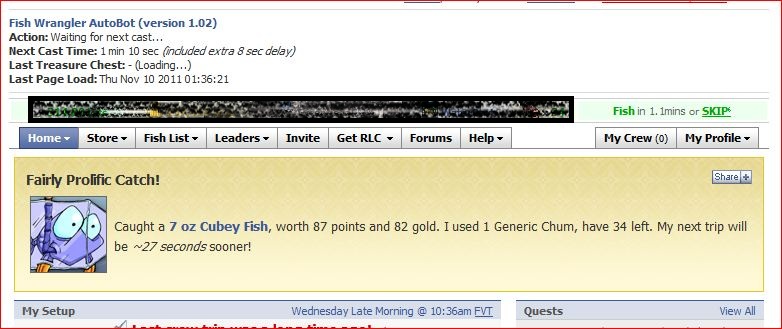
Fish Wrangler AutoBot is a simple user script to automate the process of catching fish in Fish Wrangler application in Facebook. In a simple word, bot for Fish Wrangler. Time of next rod cast will show on the webpage title and page. Users can customize the script according to their need by themselves such as add extra random time delay before casting the rod (Please look for UserPreferenceSetting in the script).


Main Features

  • Automatically cast rod when time’s up with extra random time define by user.
  • Show next rod casting time and others timer in the page and title.
  • Play music when found treasure cheats.
  • Cross-browsers support.

Paltform Support

Browser Support

  • Mozilla Firefox with Greasemonkey add-on (Tested with Mozilla Firefox 7.0.1 with Greasemonkey 0.9.8 add-on)
  • Opera (Tested with Opera 11.50)
  • Google Chrome (Tested with Google Chrome 15.0)

Precautions

  • Use this script at your own risk because AutoBot script is again the rule set by Fish Wrangler, that is users are prohibits the use of auto-refreshers, BOTs, constantly refreshing the Fish Now link.
  • You are reminded not to use your real name or the same name you use in Facebook to post / reply discussion here because some one might go after you and please don’t ask me why I use my real name here.
  • Do uninstall any other Fish Wrangler automation scripts or auto page reload scripts before install this script to prevent conflict with this script.

Known Issues

  • The script may appear much later after the page had loaded.

How to Install User Script

Download

Download through userscript website.

Changelog

Version 1.02

  • Fix script unable to run in secure connection (https).
  • Fix timer fail to work after Fish Wrangler change the code.

by Ooi Keng Siang via Ooiks’s Blog


strong

Bug in AdMob SDK for Windows Phone 7 Version 4.0.4

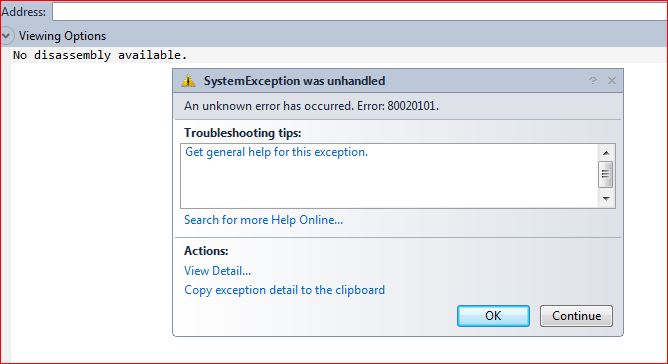
Today, when I’m trying to continue working on one of my Windows Phone app and suddenly the app force quit every time I run the app. Man, it is working correctly last night and now it doesn’t work anymore! What the hack is this “An unknown error has occurred. Error: 80020101.”? The error did not give me a good idea what is it all about.

I can’t really guess what actually happening. After spending a long time checking what went wrong, then I found out Google AdMob control which I use to display advertisement is not working correctly and it keep on throwing error when it put into visual tree.  So I do some search and found out that the AdMob SDK has cause quite number of problems in current version. Lot of developers complain about this problem but no work around or fix is provided by Google.

I try several way like putting try/catch, generate ad from code behind, generate ad from loaded function and many more. All doesn’t work and it still throwing error, ARGH!! There are only 2 options left for me. First option, completely remove AdMob from my app and I will gain nothing from the app. Second option, ignore the error.

Since the app I created is pretty simple and it is for demo purpose, so I will keep the ad and ignore the error.  By setting exception handled to true, it should stop the app from force close when running. Of cause it will still pop up error when you running in debugging mode. I will just comment out the ad control coding part when I debugging the app and un-comment it when I finish develop it.

I had submitted the app to Windows Phone marketplace. I not sure whatever it can go through the certification process or not but I shall update this post when the result is out. Yes, my app get through the certification without problem. In the end, I still cannot figure out what is actually happening to the SDK which is working flawless for the pass 2 weeks and it now cause me so much trouble. Let’s hope the developer (Google) fix this mess as soon as possible. Meanwhile, only 2 options, either remove all or ignore it!

[Update] I had fix the problem using Ad Rotator instead, check out my latest post here.

by Ooi Keng Siang (Microsoft Student Partners) via Ooiks’s Blog

How to Configure Outlook 2010 for USM Student Mail (Updated)

If you are a Universiti Sains Malaysia (USM) students and you have Microsoft Outlook 2010 installed on your PC. You might have the trouble connecting your Microsoft Outlook 2010 with your student mail, just like me. Thing get worse when the student mail fully migrate to Microsoft Exchange instead of hosting on live server which cause hotmail connector no longer work. I’m not going to use POP3 setting like the FAQ mention in USM Mail website, who the hack on earth still using POP3 anyway. If you setup your Outlook to use IAMP for USM student mail like what I did previously, you will have a lot of trouble like confirm the certificate every time open Outlook or some time cannot connect to the server!

Enough of the problems. Now I’m here to share how I’m able to fully connected to the mail server.

1. Close your Microsoft Outlook if is open (Install Microsoft Outlook first if you haven’t done so).

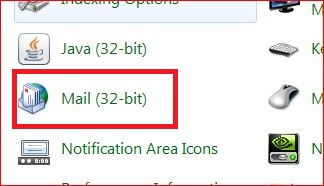
2. Go to Control Panel  > Mail (32-bit)

3. Click on  E-mail Accounts…

4.  Click on New… under E-mail tab (You must remove your student mail account you had previously configure into the Microsft Outlook which will be listed below.)

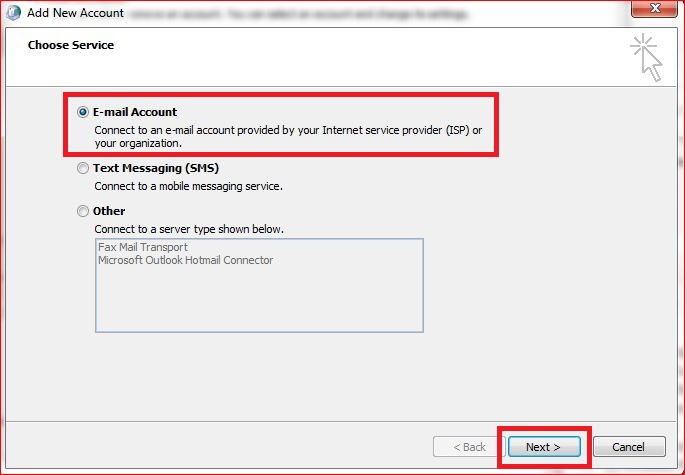
5.  Select E-mail Account and click Next on the bottom.

6.  Select Manually configure server settings or additional server types and click Next on the bottom.

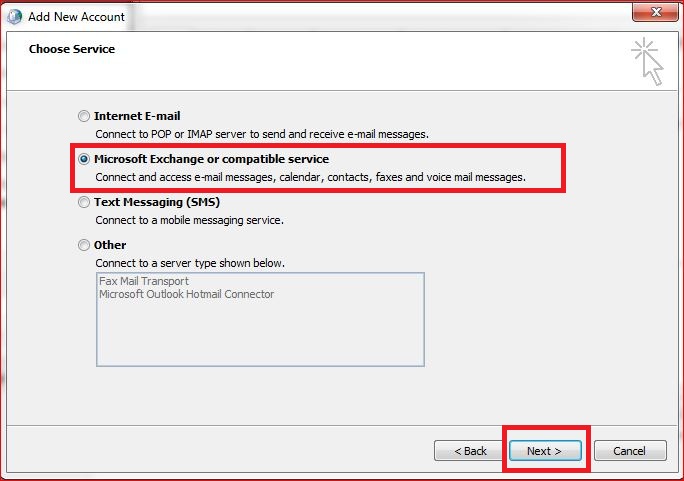
7. Select Microsoft Exchange or compatible service  and click Next on the bottom. (If you why Microsoft Exchange, the new student mail had moved to Microsoft Exchange server instead of Live server)

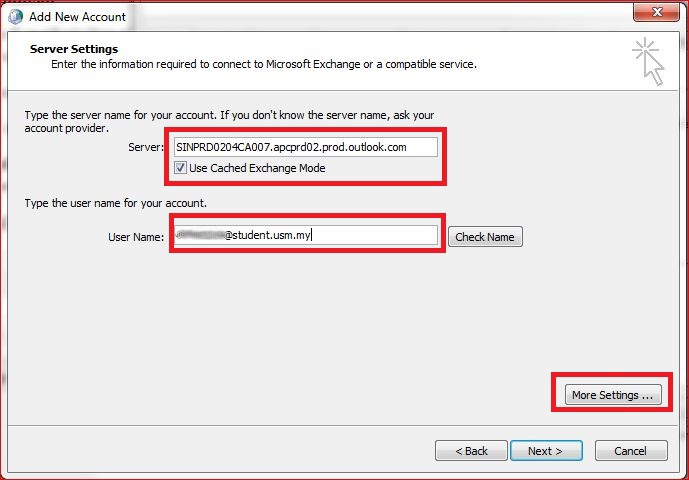
8.  Enter “SINPRD0204CA007.apcprd02.prod.outlook.com” into Server and your student mail address (@student.usm.my) into User Name and click More Settings… on the bottom. (If you wonder where to get the server name, check the information bellow) (Don’t click on Check Name now, it will fail for sure)

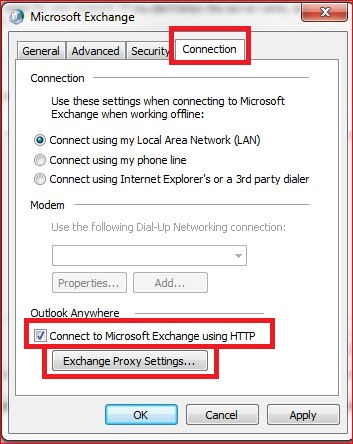
9. Select Connection tab and check Connect to Microsoft Exchange using HTTP under Outlook Anyway. Then click Exchange Proxy Setting…

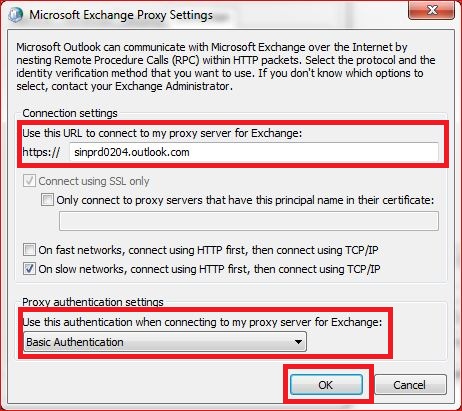
10. Enter “sinprd0204.outlook.com” into the proxy server and select Basic Authentication for Proxy authentication settings then click OK on the bottom.  (If you wonder where to get the proxy server name, check the information bellow)

11. Click OK again to close the dialog for Exchange setting.

12. Now you can click on Check Name to see if all configuration is correct or not. If everything go right, you shall see a dialog pop up to call you enter the password. You shall see the Server and User Name changed to text with underline if all configuration success. Click Next.

13. Click Finish on the bottom and we are done!

14. Open your Microsoft Outlook and you will have your e-mail there.


If you want to know how to get the server name and proxy server name. Here is how you get that.

1. Login to your email through web browser.

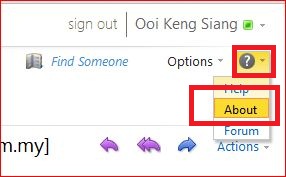
2. Click on the help icon and select About.

3. Exchange Client Access server name is the server name for the mail box and Host name is the proxy server name for login.


The major problem for USM student mail is they use Microsoft Exchange server by still using live ID for authentication. Thus by using default Microsoft Exchange Server setting or Live Mail setting will not work at all. I’m very disappointed on how USM provide support on their e-mail service. After long explain on how great they now move to a new server but tell user to use POP3 setting. Then what is the point offering calendar service while we only can use POP3 setting for Outlook?

P.S.: Using Windows Live Mail program for USM student mail will only allow you to receive e-mail but it won’t be able to send out e-mail due to Windows Live Mail program only support SSL connection while USM student mail require TLS connection.

by Ooi Keng Siang (Microsoft Student Partners) via Ooiks’s Blog

MouseHunt AutoBot 1.26 – Rollback Patch for Firefox

As you all know Firefox screw the script again. During version 1.23, Firefox update cause unsafe windows broken down and I force to use Content Global Reader in version 1.24. Now Content Global Reader stop working in Firefox when MouseHunt running in Facebook frame. So I use back unsafe windows which now can be used again. What a joke.

Thing is running now. I also fix some minor problems when player sound the horn manually. Check the changelog for more detail. Sorry, no mobile page version supported for this version yet, as I’m too busy with other stuff. It will be a long delay for this feature to come. No worry, I will still spend some of my time to fix some major bug if there is any.

Script Description

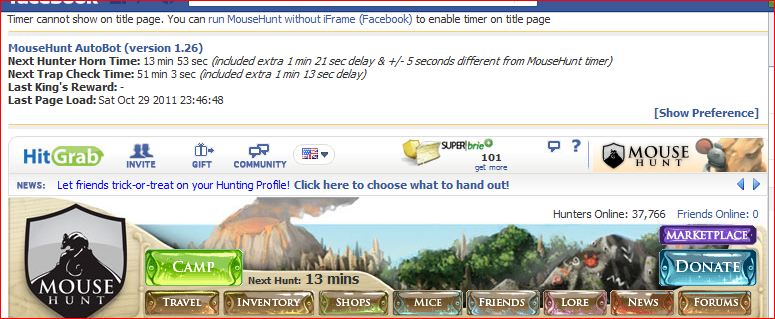
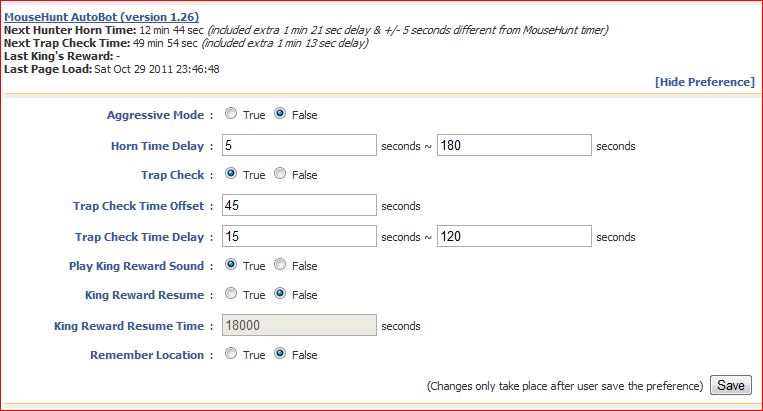
MouseHunt AutoBot is an advance user script to automate sounding the hunter horn in MouseHunt application in Facebook, Hi5 and offside MouseHunt page with MouseHunt version 3.0 (Longtail) supported and many other features. In a simple word, bot for MouseHunt. Time of next hunter horn and trap check will show on the web page title. The time of the next hunter horn will automatically detected without refreshing the page again. Users can customize the script according to their need by themselves such as add extra random time delay before sounding the hunter horn. Users can choose to bot safety with many safety check features which act like a human, or bot aggressively. Part of the script is actually base on Facebook MouseHunt Game Auto Horn Blower.

Main Features

  • Support MouseHunt version 3.0 (Longtail).
  • Automatically sound horn when time’s up with extra random time define by player.
  • Simulate mouse click on the horn image instead of URL sound horn.
  • Automatically detect and retrieval the next horn time without refreshing the page.
  • Show next hunter horn and others timer in the page and title.
  • Stop bot when player move to location different than pre-define location.
  • Safety features such as check horn image is visible or not before sounding the horn. (bot can sound the horn without the horn appear first if aggressiveMode is on)
  • Cross-browsers support.
  • Set preference setting such as horn delay time directly in the game.

Platform Support

Browser Support

  • Mozilla Firefox with Greasemonkey add-on (Tested with Mozilla Firefox 7.0.1 with Greasemonkey 0.9.8 add-on)
  • Opera (Tested with Opera 11.50)
  • Google Chrome (Tested with Google Chrome 15.0)

Precautions

  • Use this script at your own risk because AutoBot script is again the rule set by MouseHunt, that is users are not allowed to use any tool to automate sounding the hunter horn.
  • You are reminded not to use your real name or the same name you use in Facebook to post / reply discussion here because some one might go after you and please don’t ask me why I use my real name here.
  • Do uninstall any other MouseHunt auto sound horn scripts before install this script to prevent conflict with this script.

Known Issues

  • Script timer is running faster than MouseHunt provided timer, this is because MouseHunt programmed the timer in a way to have +/- 5 seconds delay.
  • The script will pause when encounter king’s reward due to MouseHunt 3.0 (Longtail) require user to resolve the captcha first no matter how long the user had idle in the game.
  • The page may have minor refresh due to Facebook / Hi5 fetching data from server, it was not related with the script.
  • Google Chrome will playing King’s Reward sound through streaming but Opera and Firefox will play directly from the script.

How to Install User Script

Download

Download through userscript website.

Changelog

Version 1.26

  • Fix Firefox unable to run correctly in Facebook frame.
  • Fix page refresh unnecessary problem after player manually sound the horn.
  • Fix automatically reset the timer after user sound the horn manually before the timer reach zero.
  • Correct some spelling error.

by Ooi Keng Siang via Ooiks’s Blog

Get Advertisement on Your Windows Phone App

One very common way to generate revenue in phone application is through displaying advertisement. This is one of the very effective approach for free app to generate side income. Currently there are only limited number of mobile advertisement supported on Windows Phone 7. Thing is even worse because I live in Malaysia which lot of mobile advertisements did not support for my country.

Using Microsoft Advertising SDK might sound the most easiest way to put some advertisement on your Windows Phone application. But very unfortunately only limited number of countries is supported in  Microsoft  Advertising pubCenter. I only able to found Australia, Belgium, Canada, Finland, France, Germany, Italy, Netherlands, Norway, Spain, United Kingdom and United States for the country or state option when registering an account for Microsoft Advertising pubCenter. Although they claim they will support more counties in the future, but I bet there will be still a long time until it reach my country.

Next, I found Smaato who they claim supported in many countries and many different platforms that include Windows Phone 7. Well, they did have a very well documented SDK for Windows Phone 7, but supported in many different countries is a question mark for me. Every time my application request an ad from Smaato, it always return an error for me which is ‘no ads available’. At first I though this error is because they haven’t get my account ready yet but after some research, I found out that this error mean there is no ad available for the combination of device/location/category. There is very high chances that I won’t get any ad in near future with Smaato for Windows Phone in my country. If I can’t even get any ad, how can I generate any revenue through advertisement then? It might be work for you, but definably not me.

Lastly, I went through a post on the forum that some one manage to port AdMob SDK to Windows Phone platform, so I decided give it a try. AdMob is one of the popular choices ad provider for Android and iOS platform which had taken over by Google. Although AdMob main page did not mention anything about Windows Phone, but they already had an official SDK for Windows Phone platform (which is in beta currently). Sweet! You need to register an account first before you can see the SDK for download. It is pretty much simple and easy with just a few line of code to get the ad on my app. You can found how easy through the tutorial here.

Since AdMob is the only option for me, then I left no choice but use AdMob only. Hopefully there are more mobile advertisement company support Windows Phone and my country as well in the future.


[Update] This post is outdated, check out my latest post here instead.


by Ooi Keng Siang (Microsoft Student Partners) via Ooiks’s Blog

Imagine Cup Grants for 2011 Finalist

As announced during the Award Ceremony in Imagine Cup 2011 worldwide final at New York, Microsoft will given USD 3M grants for finalist to apply in order to kick start their idea. The detail of the grants is finally announced. the grant only have limited place for finalist, thus 2 round of selection will determine which team won the grant.

The grant will judge base on:

  • Problem Definition (10%): How well does the team convey their understanding of the complexities involved in addressing the problem and, how convincing is the argument that the issue they are addressing has broad appeal and relevance
  • Impact and Viability of the Solution (40%): To what degree will the solution have an impact on the issue? Is the solution technically and economically viable? Are the timing and conditions right for this solution? Has the solution already been implemented in some way to demonstrate or test that it is viable?
  • Solution Design and Innovation (20%): Does the solution provide an innovative approach the problem? How does it surpass previous or current solutions to this problem?
  • Team Quality and Motivation (30%): What is the quality of leadership in the team? How solid is the business planning for the solution? What are the obstacles for the team to take the solution to market? How does the team intend to organize itself to accomplish its plan?

It is a great opportunity for finalist to apply and kick start their business using the grant offer by Microsoft. The grant offer the following awards to those who successfully applied the grants:

  •  A Cash grant amount depending on the grantee team’s business plan and project scope. (Estimated between $75,000 U.S. Dollars and $100,000 U.S. Dollars)
  • Software required to support the implementation of their solution. Software offerings will be determined based on the needs of the grantee’s solution and go to market plan.
  • Mentorship by a Microsoft representative in their country or region.
  • Introductions to potential funders and partners.
  • Support from Microsoft local partners.
  • Access to Microsoft resources including Microsoft Innovation Centers, premium BizSpark benefits, time and support from Microsoft employees and product groups.

For more information on Imagine Cup Grants visit: http://www.imaginecup.com/CompetitionsContent/ImagineCupGrants.aspx

Every year Microsoft surprise me with how much money and effort their put on students through Imagine Cup. I can’t think of any student competition that can beat Imagine Cup, they give free trip, prize money, news coverage, grant, hardware and many more students to make sure they create something innovative. I’m looking forward the listen to the success story of the students through the grant offer by Microsoft.

by Ooi Keng Siang – MSPSMT via Ooiks’s Blog
MouseHunt AutoBot Stop Working After Opera Update

MouseHunt Auto will stop working without any error after Opera web browser update and if you enable secure connection (https) for your Facebook account. This is because Opera will reset the UserPrefs after update. You need to enable back UserJavaScriptonHTTPS in  UserPrefs in order for any user scripts to run in secure connection or https.

Here explain how you can enable user script in secure connection for Opera web browser.

I very busy on other stuff lately. Please expect some delay answering your question and script update need to be postpone unless got major problem only.

by Ooi Keng Siang via Ooiks’s Blog

Tally Counter – My First Windows Phone 7 Assignment

Few week ago, I had gone through a Windows Phone 7 workshop conducted by Microsoft Malaysia for students. I was required to develop an application in order to try out the Windows Phone marketplace submission process. Lot of ideas flowing through my mind, but none of those great ideas can be completed within 2 days time limit. So I decided to create a simple application. Just a simple application doesn’t make thing interesting, so I did some research before I start coding (something I learn in Imagine Cup ya).

I decided to create a simple tally counter application. Then I do a simple search on Windows Phone marketplace for similar applications. As I expected, there are quite a number of similar applications out there, but I also found out that there are still room for improvement in this simple application through the reviews and comments from user posted on the other applications. Done with the research then I direct jump into development.

What user want in a simple tally counter app:

  • A big button to tap and increase the count
  • Undo button just in case they did some mistake
  • Previous count number

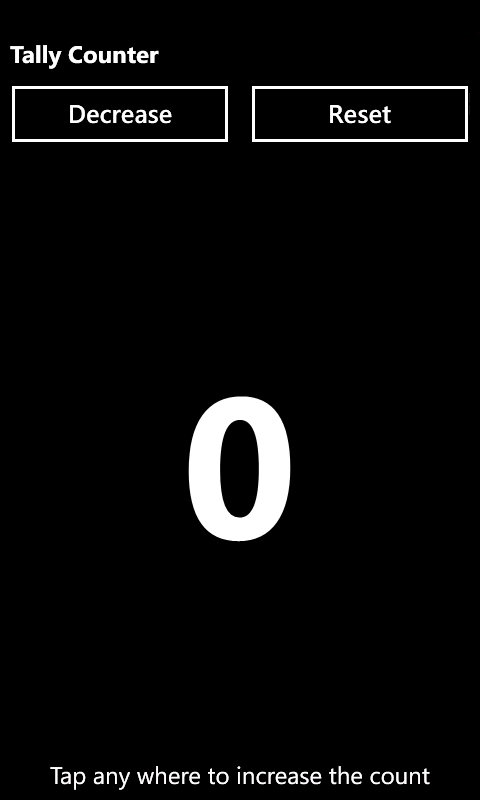
None of existing tally counter app can answer all 3 requirement of user, so the TallyCounter app I came out with:

  •  A simple and clean design of tally counter app.
  • Can count up to 9999.
  • Can tap at almost anyway on the screen to increase the count.
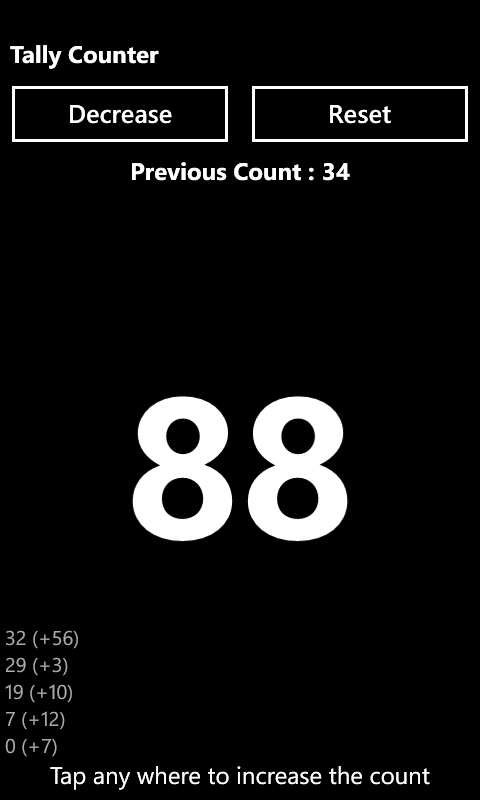
  • Move all unnecessary button like reset button to the top because I understand user always use their thumb to tap on the screen.
  • Undo button with extra bonus that the app can tell you up to  5 history records which you had just pressed for the last 1 seconds.
  • Previous count number as requested by a lot of user in the marketplace.


Without any problem, my app went smoothly through the certification of Windows Phone marketplace and it now up on the marketplace. You can check it out here. Yes, it is free and without any advertisement as I don’t have any reason to price a simple app like this.

In my opinion, Windows Phone marketplace is still very new. There are still a lot of improvement you can make on existing application which many had ignored like in my case which is a simple tally counter app. Next, I’m going to create an application for Magic the Gathering as I found out the features in most of the app out there in Windows Phone marketplace are far behind than other platform like Adroind or iOS.

by Ooi Keng Siang (Microsoft Student Partners) via Ooiks’s Blog