Imagine Cup 2012 – First 4 Categories Announced

Imagine Cup official website just announced 4 categories for Imagine Cup 2012 which will be held at Australia. They are Software DesignGame Design (Xbox/Windows),  Game Design (Phone) and IT Challenge. For those who are interested to join IT Challenge, you better act fast as IT Challenge round one end earlier than any other categories. Are you looking for other categories like side award? They are not announced yet, but I’m sure Imagine Cup will reveal more and more categories in the future.

The theme for Imagine Cup 2012 is “Imagine a world where technology helps solve the toughest problems”. Imagine Cup challenge student to solve the toughest problems in United Nations Millennium Development Goals which help to create a better world. Remember to check out the MDG to make sure your idea is fit for the MDG problem.

What? You haven’t even register yourself in Imagine Cup yet? No worry if you haven’t think of which category to join or haven’t come out the idea. Just register yourself first so that you can receive the latest update from Imagine Cup through e-mail.

[Update 1] : What happen to Embedded Development, Game Design (Web) and Digital Media this year? Embedded Development is combined with Software Design while Game Design (Web) and Digital Media was removed in Imagine Cup 2012. This is kind of sad. Source: http://www.imaginecup.com/CompetitionsContent/FAQ.aspx

by Ooi Keng Siang – MSPSMT via Ooiks’s Blog

MouseHunt AutoBot 1.25 – Emergency Patch for Opera Browser

Sorry for another emergency patch for the script. I super duper hope this is the last one. I miss out Opera browser testing before putting the script up. This one include emergency patch for Firefox and Opera. I bet there are also some changes made by the MouseHunt game, but I’m not really sure what they had changed.

Hope those of you who use Opera but unable to use the script, check this post. I’m also working on the mobile version of the MouseHunt game site. Keep all the suggestion flow in, I will read and consider. Thanks for all the support, bug report and suggestion.

Script Description

MouseHunt AutoBot is an advance user script to automate sounding the hunter horn in MouseHunt application in Facebook, Hi5 and offside MouseHunt page with MouseHunt version 3.0 (Longtail) supported and many other features. In a simple word, bot for MouseHunt. Time of next hunter horn and trap check will show on the web page title. The time of the next hunter horn will automatically detected without refreshing the page again. Users can customize the script according to their need by themselves such as add extra random time delay before sounding the hunter horn. Users can choose to bot safety with many safety check features which act like a human, or bot aggressively. Part of the script is actually base on Facebook MouseHunt Game Auto Horn Blower.

Main Features

  • Support MouseHunt version 3.0 (Longtail).
  • Automatically sound horn when time’s up with extra random time define by player.
  • Simulate mouse click on the horn image instead of URL sound horn.
  • Automatically detect and retrieval the next horn time without refreshing the page.
  • Show next hunter horn and others timer in the page and title.
  • Stop bot when player move to location different than pre-define location.
  • Safety features such as check horn image is visible or not before sounding the horn. (bot can sound the horn without the horn appear first if aggressiveMode is on)
  • Cross-browsers support.
  • Set preference setting such as horn delay time directly in the game.

Platform Support

Browser Support

  • Mozilla Firefox with Greasemonkey add-on (Tested with Mozilla Firefox 6.0.2 with Greasemonkey 0.9.8 add-on)
  • Opera (Tested with Opera 11.51)
  • Google Chrome (Tested with Google Chrome 13.0)

Precautions

  • Use this script at your own risk because AutoBot script is again the rule set by MouseHunt, that is users are not allowed to use any tool to automate sounding the hunter horn.
  • You are reminded not to use your real name or the same name you use in Facebook to post / reply discussion here because some one might go after you and please don’t ask me why I use my real name here.
  • Do uninstall any other MouseHunt auto sound horn scripts before install this script to prevent conflict with this script.

Known Issues

  • Script timer is running faster than MouseHunt provided timer, this is because MouseHunt programmed the timer in a way to have +/- 5 seconds delay.
  • The script will pause when encounter king’s reward due to MouseHunt 3.0 (Longtail) require user to resolve the captcha first no matter how long the user had idle in the game.
  • The page may have minor refresh due to Facebook / Hi5 fetching data from server, it was not related with the script.
  • Google Chrome will playing King’s Reward sound through streaming but Opera and Firefox will play directly from the script.

User Script Help

Download

Download through userscript website.

Changelog

Version 1.25

  • Fix Opera script stopped after sounding the first horn.
  • Add message that the script is not supporting the mobile version of MouseHunt game yet.

Version 1.24

  • Fix Firefox unable to read javascript variable and cause the script keep on reload after sounding the horn.
  • Fix trap check delay time always zero problem.
  • Add Remember Location to preference setting in game.

by Ooi Keng Siang via Ooiks’s Blog

Enable User Scripts on Secure Page (HTTPS) in Opera Browser

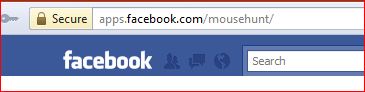
You might notice Opera actually did not allow user script to run on secure page (page with https address) by default, but we need this in order to run user script on our game in Facebook which now can be run on a secure connection or https.

The fix is simple, simply open the given link “opera:config#UserPrefs|UserJavaScriptonHTTPS“, tick User JavaScript on HTTPS and remember to click Save (at the bottom)!

You will need to restart your Opera browser to make it work (simply close and re-open back the Opera browser). You should see the dialog box below. just click Yes and you can now execute user script on https.

by Ooi Keng Siang via Ooiks’s Blog

MouseHunt AutoBot 1.24 – Emergency Patch for Firefox 6.0.1

Sorry for another emergency patch for the script. Firefox screw the script again. The script fail to retrieve any data from the game after update to Firefox 6.0.1. After much investigation, I found out that  unsafewindow no longer usable. It doesn’t return the result I want. I’m force to use Content Global Reader to replace unsafewindow in order to successfully retrieve the data from javascript again. I hate Firefox, keep on causing trouble compare with other browser.

I also fixed the  trap check delay time bug and add hunt location preference setting into the game for this version.  Sorry for all the bugs and small patch. Enjoy the game.


Script Description

MouseHunt AutoBot is an advance user script to automate sounding the hunter horn in MouseHunt application in Facebook, Hi5 and offside MouseHunt page with MouseHunt version 3.0 (Longtail) supported and many other features. In a simple word, bot for MouseHunt. Time of next hunter horn and trap check will show on the web page title. The time of the next hunter horn will automatically detected without refreshing the page again. Users can customize the script according to their need by themselves such as add extra random time delay before sounding the hunter horn. Users can choose to bot safety with many safety check features which act like a human, or bot aggressively. Part of the script is actually base on Facebook MouseHunt Game Auto Horn Blower.

Main Features

  • Support MouseHunt version 3.0 (Longtail).
  • Automatically sound horn when time’s up with extra random time define by player.
  • Simulate mouse click on the horn image instead of URL sound horn.
  • Automatically detect and retrieval the next horn time without refreshing the page.
  • Show next hunter horn and others timer in the page and title.
  • Stop bot when player move to location different than pre-define location.
  • Safety features such as check horn image is visible or not before sounding the horn. (bot can sound the horn without the horn appear first if aggressiveMode is on)
  • Cross-browsers support.
  • Set preference setting such as horn delay time directly in the game.

Platform Support

Browser Support

  • Mozilla Firefox with Greasemonkey add-on (Tested with Mozilla Firefox 6.0.1 with Greasemonkey 0.9.8 add-on)
  • Opera (Tested with Opera 11.50)
  • Google Chrome (Tested with Google Chrome 13.0)

Precautions

  • Use this script at your own risk because AutoBot script is again the rule set by MouseHunt, that is users are not allowed to use any tool to automate sounding the hunter horn.
  • You are reminded not to use your real name or the same name you use in Facebook to post / reply discussion here because some one might go after you and please don’t ask me why I use my real name here.
  • Do uninstall any other MouseHunt auto sound horn scripts before install this script to prevent conflict with this script.

Known Issues

  • Script timer is running faster than MouseHunt provided timer, this is because MouseHunt programmed the timer in a way to have +/- 5 seconds delay.
  • The script will pause when encounter king’s reward due to MouseHunt 3.0 (Longtail) require user to resolve the captcha first no matter how long the user had idle in the game.
  • The page may have minor refresh due to Facebook / Hi5 fetching data from server, it was not related with the script.
  • Google Chrome will playing King’s Reward sound through streaming but Opera and Firefox will play directly from the script.

How to Install User Script

Download

Download through userscript website.

Changelog

Version 1.24

  • Fix Firefox unable to read javascript variable and cause the script keep on reload after sounding the horn.
  • Fix trap check delay time always zero problem.
  • Add Remember Location to preference setting in game.

by Ooi Keng Siang via Ooiks’s Blog

MouseHunt AutoBot 1.23

Just a quick fix for secure connection problem in Facebook that cause the script unable to work. Sorry about that. Some new players not familiar with the script so I also add description for each preference. Just mouse over the preference, the tooltip will give more information about it. Just a minor update this time, enjoy the game.

Script Description

MouseHunt AutoBot is an advance user script to automate sounding the hunter horn in MouseHunt application in Facebook, Hi5 and offside MouseHunt page with MouseHunt version 3.0 (Longtail) supported and many other features. In a simple word, bot for MouseHunt. Time of next hunter horn and trap check will show on the web page title. The time of the next hunter horn will automatically detected without refreshing the page again. Users can customize the script according to their need by themselves such as add extra random time delay before sounding the hunter horn. Users can choose to bot safety with many safety check features which act like a human, or bot aggressively. Part of the script is actually base on Facebook MouseHunt Game Auto Horn Blower.

Main Features

  • Support MouseHunt version 3.0 (Longtail).
  • Automatically sound horn when time’s up with extra random time define by player.
  • Simulate mouse click on the horn image instead of URL sound horn.
  • Automatically detect and retrieval the next horn time without refreshing the page.
  • Show next hunter horn and others timer in the page and title.
  • Stop bot when player move to location different than pre-define location.
  • Safety features such as check horn image is visible or not before sounding the horn. (bot can sound the horn without the horn appear first if aggressiveMode is on)
  • Cross-browsers support.
  • Set preference setting such as horn delay time directly in the game.

Platform Support

Browser Support

  • Mozilla Firefox with Greasemonkey add-on (Tested with Mozilla Firefox 5.0 with Greasemonkey 0.9.7 add-on)
  • Opera (Tested with Opera 11.50)
  • Google Chrome (Tested with Google Chrome 13.0)

Precautions

  • Use this script at your own risk because AutoBot script is again the rule set by MouseHunt, that is users are not allowed to use any tool to automate sounding the hunter horn.
  • You are reminded not to use your real name or the same name you use in Facebook to post / reply discussion here because some one might go after you and please don’t ask me why I use my real name here.
  • Do uninstall any other MouseHunt auto sound horn scripts before install this script to prevent conflict with this script.

Known Issues

  • Script timer is running faster than MouseHunt provided timer, this is because MouseHunt programmed the timer in a way to have +/- 5 seconds delay.
  • The script will pause when encounter king’s reward due to MouseHunt 3.0 (Longtail) require user to resolve the captcha first no matter how long the user had idle in the game.
  • The page may have minor refresh due to Facebook / Hi5 fetching data from server, it was not related with the script.
  • Google Chrome will playing King’s Reward sound through streaming but Opera and Firefox will play directly from the script.

How to Install User Script

Download

Download through userscript website.

Changelog

Version 1.23

  • Fix script unable to run in Facebook secure connection (https).
  • Add preference description in tooltip for each preference.

Version 1.22

  • Fix some incorrect preference setting default value.
  • Fix Firefox unable to play King Reward’s sound correctly.
  • Fix some memory leak problems.
  • Fix Opera unable to play King Reward’s sound continently (Note: There will be a big gap between the last sound end and the new sound begin).
  • Improve timer accuracy.

Version 1.21

  • Fix script will now auto reload if encounter any MouseHunt intro page which is a bug in the game if player using Google Chrome.
  • Fix script unable to work when showTimerInPage is set to false.
  • Aggressive mode will now ignore any extra time delay set by player.
  • Script can now automatically reset the timer after user sound the horn manually before the timer reach zero.
  • King Reward music is now play direct from the script instead of stream it from other site (only for Firefox and Opera web browser).
  • Player can now set preference such as horn time delay directly in game instead of editing the script.

by Ooi Keng Siang via Ooiks’s Blog

MouseHunt AutoBot 1.22

First of all, I would like to apologies for the memory leak problem in last version. I was in a hurry to push out the script without much testing. Thanks for those players who give me lot of feedbacks in order for me to fix the problems. No new feature in this version, just lot of bugs fixing this time.

Although the script should be more stable and consume less memory now, but you will still notice the memory will be increasing time to time if you running in Firefox. One of the reason is MouseHunt and Facebook themselves also have memory leak problem, if you play MouseHunt in Facebook without the script, you will notice the small increasing of memory from time to time. The memory leak problem should be much better compare with last time. I personally run the MouseHunt with the latest script for the whole day, the memory go from 127,000 K to 170,000+ K for the whole day. Another reason might be Firefox javascript engine problem as well.

There are also bug fix for other browser as well, so make sure you use this one than version 1.21. Do tell me if you found any problem on the script. For Firefox user, do tell me how is the memory going. I guess you can go full speed boting the whole day with this version of script now. Enjoy.

Script Description

MouseHunt AutoBot is an advance user script to automate sounding the hunter horn in MouseHunt application in Facebook, Hi5 and offside MouseHunt page with MouseHunt version 3.0 (Longtail) supported and many other features. In a simple word, bot for MouseHunt. Time of next hunter horn and trap check will show on the web page title. The time of the next hunter horn will automatically detected without refreshing the page again. Users can customize the script according to their need by themselves such as add extra random time delay before sounding the hunter horn. Users can choose to bot safety with many safety check features which act like a human, or bot aggressively. Part of the script is actually base on Facebook MouseHunt Game Auto Horn Blower.

Main Features

  • Support MouseHunt version 3.0 (Longtail).
  • Automatically sound horn when time’s up with extra random time define by player.
  • Simulate mouse click on the horn image instead of URL sound horn.
  • Automatically detect and retrieval the next horn time without refreshing the page.
  • Show next hunter horn and others timer in the page and title.
  • Stop bot when player move to location different than pre-define location.
  • Safety features such as check horn image is visible or not before sounding the horn. (bot can sound the horn without the horn appear first if aggressiveMode is on)
  • Cross-browsers support.
  • Set preference setting such as horn delay time directly in the game.

Platform Support

Browser Support

  • Mozilla Firefox with Greasemonkey add-on (Tested with Mozilla Firefox 5.0 with Greasemonkey 0.9.7 add-on)
  • Opera (Tested with Opera 11.50)
  • Google Chrome (Tested with Google Chrome 13.0)

Precautions

  • Use this script at your own risk because AutoBot script is again the rule set by MouseHunt, that is users are not allowed to use any tool to automate sounding the hunter horn.
  • You are reminded not to use your real name or the same name you use in Facebook to post / reply discussion here because some one might go after you and please don’t ask me why I use my real name here.
  • Do uninstall any other MouseHunt auto sound horn scripts before install this script to prevent conflict with this script.

Known Issues

  • Script timer is running faster than MouseHunt provided timer, this is because MouseHunt programmed the timer in a way to have +/- 5 seconds delay.
  • The script will pause when encounter king’s reward due to MouseHunt 3.0 (Longtail) require user to resolve the captcha first no matter how long the user had idle in the game.
  • The page may have minor refresh due to Facebook / Hi5 fetching data from server, it was not related with the script.
  • Google Chrome will playing King’s Reward sound through streaming but Opera and Firefox will play directly from the script.

How to Install User Script

Download

Download through userscript website.

Changelog

Version 1.22

  • Fix some incorrect preference setting default value.
  • Fix Firefox unable to play King Reward’s sound correctly.
  • Fix some memory leak problems.
  • Fix Opera unable to play King Reward’s sound continently (Note: There will be a big gap between the last sound end and the new sound begin).
  • Improve timer accuracy.

Version 1.21

  • Fix script will now auto reload if encounter any MouseHunt intro page which is a bug in the game if player using Google Chrome.
  • Fix script unable to work when showTimerInPage is set to false.
  • Aggressive mode will now ignore any extra time delay set by player.
  • Script can now automatically reset the timer after user sound the horn manually before the timer reach zero.
  • King Reward music is now play direct from the script instead of stream it from other site (only for Firefox and Opera web browser).
  • Player can now set preference such as horn time delay directly in game instead of editing the script.

by Ooi Keng Siang via Ooiks’s Blog

MouseHunt AutoBot 1.21

Sorry for the long waiting. I was busy with lot of stuffs recently and the development process was drag down by Opera and Google Chrome web browser for many days due to the sound problem. I only manage to fix the Opera but not Google Chrome. But I plan to release it without one new feature for Google Chrome because I really drag for too long already. Sorry Google Chrome fans!

One of the big changes you will notice in this release is you can now set the script setting inside the game! So now you don’t need to learn how to set them by using notepad or what so ever. Be warn that those setting is not permanent if you just change it in the game, the script use temporary storage to store those setting only. In case if you delete all browser storage and cache, the setting will go away and back to what had been written in the script. So remember to change back the setting when you delete all browser storage and cache.

Lot of players keep on asking me how to play music from local drive. The answer will always “You can’t because the script can’t”. The script just can’t access to the file system because of security reason. But don’t be so sad,  now I embed the whole music in the script and it will now play directly without any streaming! Of course, the script size is bigger than before now because of the music data, but it will save your a lot of bandwidth later on.  Too bad this feature only apply for Opera and Firefox web browser, Google Chrome will still stream the music for this version. Oh ya, I use some hex encoding on the music, so it is impossible for other to change the music unless you know how to modify midi sound to hex encoding.

Another thing you might be notice is when you manually click on the horn, the script is now smart enough to know that you had press the horn and it will now start re-calculating the time. Thanks to some players told me the bug that the time is actually not correct if they press the horn manually. For other change, just read the change log at the bottom.

Some time I really wonder why I need to fix all those bugs left by the MouseHunt developer especially on Google Chrome web browser (check out the version 1.20 and 1.21 change log).  Ha, maybe I should drop them an e-mail saying your game need me because I’m helping you all the patch it. But wait, they hate me so much right because I developing a bot for the game! Well, who care to tell them anyway, I fix that because the player request me to do so.

Oh ya, lot of Firefox users told me that there are memory leak in the script in Firefox 5.0. I don’t really experience that, and I can’t really figure out is the game problem or the script problem also. So if you are a Firefox user, mind to tell me if you got this kind of problem or not? Running with script or without script in the game? Thanks.

Script Description

MouseHunt AutoBot is an advance user script to automate sounding the hunter horn in MouseHunt application in Facebook, Hi5 and offside MouseHunt page with MouseHunt version 3.0 (Longtail) supported and many other features. In a simple word, bot for MouseHunt. Time of next hunter horn and trap check will show on the webpage title. The time of the next hunter horn will automatically detected without refreshing the page again. Users can customize the script according to their need by themselves such as add extra random time delay before sounding the hunter horn. Users can choose to bot safety with many safety check features which act like a human, or bot aggressively. Part of the script is actually base on Facebook MouseHunt Game Auto Horn Blower.

Main Features

  • Support Mousehunt version 3.0 (Longtail).
  • Automatically sound horn when time’s up with extra random time define by player.
  • Simulate mouse click on the horn image instead of URL sound horn.
  • Automatically detect and retrieval the next horn time without refreshing the page.
  • Show next hunter horn and others timer in the page and title.
  • Stop bot when player move to location different than pre-define location.
  • Safety features such as check horn image is visible or not before sounding the horn. (bot can sound the horn without the horn appear first if aggressiveMode is on)
  • Cross-browsers support.
  • Set preference setting such as horn delay time directly in the game.

Platform Support

Browser Support

  • Mozilla Firefox with Greasemonkey add-on (Tested with Mozilla Firefox 5.0 with Greasemonkey 0.9.7 add-on)
  • Opera (Tested with Opera 11.50)
  • Google Chrome (Tested with Google Chrome 13.0)

Precautions

  • Use this script at your own risk because AutoBot script is again the rule set by MouseHunt, that is users are not allowed to use any tool to automate sounding the hunter horn.
  • You are reminded not to use your real name or the same name you use in Facebook to post / reply discussion here because some one might go after you and please don’t ask me why I use my real name here.
  • Do uninstall any other MouseHunt auto sound horn scripts before install this script to prevent conflict with this script.

Known Issues

  • Script timer is running faster than MouseHunt provided timer, this is because MouseHunt programmed the timer in a way to have +/- 5 seconds delay.
  • The script will pause when encounter king’s reward due to MouseHunt 3.0 (Longtail) require user to resolve the captcha first no matter how long the user had idle in the game.
  • Timer will run slower / inaccurate if the browser is running resource hungry application such as flash game.
  • The page may have minor refresh due to Facebook / Hi5 fetching data from server, it was not related with the script.
  • Opera only able to play King’s Reward once and not continently.
  • MouseHunt in game timer and AutoBot horn timer both may run incorrectly in Google Chrome due to bug in MouseHunt game.
  • Google Chrome will playing King’s Reward sound through streaming but Opera and Firefox will play directly from the script.

How to Install User Script

Download

Download through userscript website.

Changelog

Version 1.21

  • Fix script will now auto reload if encounter any MouseHunt intro page which is a bug in the game if player using Google Chrome.
  • Fix script unable to work when showTimerInPage is set to false.
  • Aggressive mode will now ignore any extra time delay set by player.
  • Script can now automatically reset the timer after user sound the horn manually before the timer reach zero.
  • King Reward music is now play direct from the script instead of stream it from other site (only for Firefox and Opera web browser).
  • Player can now set preference such as horn time delay directly in game instead of editing the script.

by Ooi Keng Siang via Ooiks’s Blog

Opera Browser Unable Play Embed Music / Sound Problem

This problem had bugged me for a few days bacause the code I written was working previously but not now. Search up and down but I can’t found any solution especially Opera is not commonly use by most people. I use the following code to play music at the background for other browsers like Firefox and Google Chrome, they work flawless but not on Opera browser for the latest version 11.50.

http://images.norack.info/prodigy_-_girls.mid


I reinstalled Apple Quick Time and Opera for a few time and nothing since to fix the problem at all. After some random testing and almost given up, I found the problem and solution. Opera latest version won’t play any music / sound / video if the hidden is set to true! Yes, that all, just because of the small changes and it screw me up for one whole week. But I still want to play the music / sound without letting people to see the player / control, so I use following code to achieve the same thing yet work on the latest Opera web browser.

http://images.norack.info/prodigy_-_girls.mid


Hope the information is helpful for those who had trouble with Opera web browser. Opera had lot of problem with the embed tag, I still can’t found a way to let the Opera continually play the music even I set loop to true. If you know how, do tell me in the comment, thanks.

by Ooi Keng Siang via Ooiks’s Blog

Google+ Profile Custom / Username Link

Google Plus Logo

A lot of you might have an account in Google+ already and those of you who are working with social networking might already posting lot of stuff at there already. One problem you encounter is that you are unable to customize your Google+ profile URL with your own username like Facebook or Twitter which was very troublesome when you want to tell other your Google+ profile link.

Instead of showing http://plus.google.com/username/ it show http://plus.google.com/bunch-of-random-number/ . You want something more meaningful to represent your profile link to others. Although some of you might use your own domain name to redirect to your own Google+ profile or use some shorten URL service to achieve the same thing, that taught by many websites, but there is already a security concern about this unknown domain name of your own or unknown destination of the shorten URL compare with some domain linke Google.com or Facebook.com can provide. For example, you will be more happy to click into http://www.facebook.com/username/ than http://tinyurl/facebook-username/ right?

Enough of the explanation. Actually Google already have what we want, just we don’t realize or or knowing it. Since all user information in Google+ is taken from Google Profile, then actually by using your Google Profile URL now, it redirect to your Google+ profile instead now. For example: http://www.google.com/profiles/username . Just in case you don’t know what to put into your username, just put the username you login to your gmail. It work perfectly for me (http://www.google.com/profiles/ooikengsiang).

by Ooi Keng Siang via Ooiks’s Blog

Imagine Cup 2007 – 2011 Yearbook

If you heard of Microsoft Imagine Cup you will probably know students use their creativity and innovation to solve the world toughest problems, those real world problems around us. In case if you just get to know about this amazing competition recently and you want to know more about what students are capable to do all this year of Imagine Cup, you can always check out their project through Imagine Cup Yearbook that was printed every year.

The Imagine Cup Yearbook is also a good resource for competitor who want to join in next year Imagine Cup 2012 at Australia. Check out what other competitor had done in the past. Bare in mind that not all ideas are unique, but is your job to make your idea better than the others. You can found the Imagine Cup yearbook since year 2007 until year 2011 at the link below.

Imagine Cup Yearbook download:

http://cid-8dcb1cd01855af44.skydrive.live.com/redir.aspx?resid=8DCB1CD01855AF44!274


by Ooi Keng Siang (MSPSMT) via Ooiks’s Blog